16 min read
Picture a factory technician staring at a machine that has stopped working. The manual is no help, the part looks unfamiliar, and the one person who knows the fix is in another country. A phone call leaves too much to guesswork, and a plain video call still does not let the expert point at the exact bolt or valve.
That gap is what PTC built Vuforia Chalk to close. The app let a remote expert see what the technician saw, talk them through the fix, and draw directly onto the live view of the machine — and the drawings stayed stuck to the real object, even as the camera moved. PTC retired Vuforia Chalk on 31 October 2025 and pointed customers toward ServiceMax Zinc instead, so you cannot sign up for it today.
In this guide
- What Is Vuforia Chalk?
- How Vuforia Chalk Works
- The Key Features That Made Chalk Stand Out
- What Happened to Vuforia Chalk?
- How to Use Vuforia Chalk
- Real-World Uses: Who Used Chalk and Why
- Vuforia Chalk vs Vuforia Engine: Not the Same Thing
- Chalk vs a Regular Video Call
- What to Use Instead of Vuforia Chalk in 2026
- Is Chalk Augmented Reality Still Worth Searching For?
- Frequently Asked Questions
What Is Vuforia Chalk?
Vuforia Chalk was a remote assistance app from PTC, the software company behind the wider Vuforia augmented reality platform. Its job: connect a person standing in front of a problem with an expert who was somewhere else, and give that expert a way to show, not just tell.
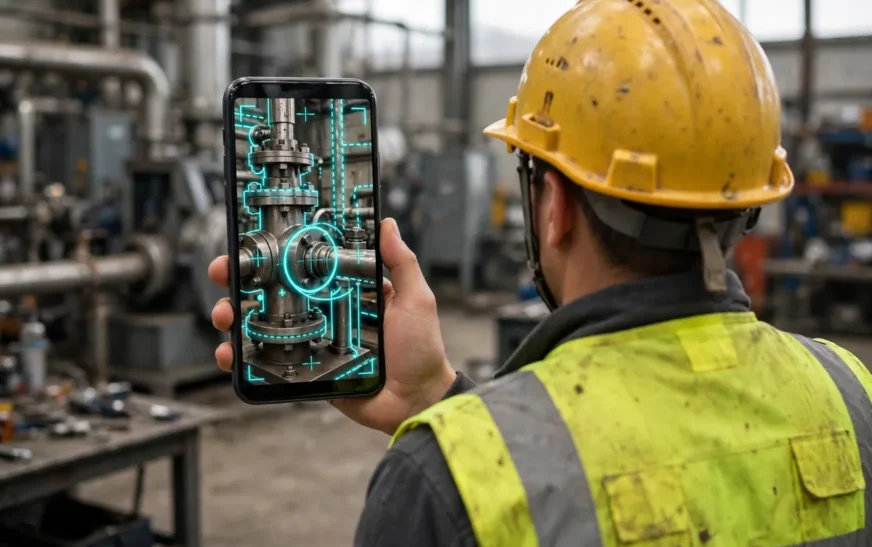
The core idea was a shared live view. The technician pointed a phone or tablet camera at the equipment, and the expert saw that feed, spoke to the technician, and drew on the image. A circle around a valve, an arrow toward a switch, a line tracing a cable route — the marks appeared on the technician’s screen, anchored to the physical object. If the technician shifted the camera, the drawing moved with the machine part it was attached to.
That anchoring was the whole point. Without it, Chalk would have been a video call with a whiteboard. With it, the expert could guide a multi-step repair as if standing next to the machine. PTC described it as a tool for scaling expert guidance to factory operations and service teams, and that is how customers used it.
Chalk was aimed at industrial work first: manufacturing, field service, equipment installation, and maintenance. It also found use in training and inspections, where an expert could mentor a new technician or confirm a setup without travelling. That focus is the opposite of the consumer AI gold rush covered in our guide to AI side hustles — Chalk was built for factory floors, not side income.
It ran on the devices companies already had: phones and tablets first, plus desktops and hands-free devices. PTC’s material listed iOS 11 or later and Android 6.0 or later devices as supported. Today’s phones are far more capable — our roundup of hidden iPhone 17 Pro features shows how much camera and AR hardware has improved since.
How Vuforia Chalk Works
The session flow was built to be fast, because a broken machine does not wait for a software setup. A technician opened the Chalk app and started a session, and the expert joined from their own device over live video and voice.
Once connected, the expert could see the technician’s camera feed in real time, and both sides could draw on the shared view. The expert might circle the component to check first, then draw an arrow to the next one. The technician could also draw, to show the expert which part they meant when words failed.
The clever part sat underneath the drawing. Chalk used computer vision to track the scene, so each annotation was tied to a point in the real world rather than a fixed spot on the screen. Move the phone, and the circle moved with the valve it was drawn around. That persistence made multi-step guidance practical: the expert could mark three things in order, and the technician could work through them without the marks drifting.
Sessions combined three channels at once: live video, voice, and the AR annotation layer. The video showed the problem, the voice carried the conversation, and the annotations carried the precision. The video itself was a plain live feed — a different world from today’s free AI video generators, which create footage rather than stream it.
The voice side depended on the same basics as any call: a working microphone and a steady connection, explained in our guide on how mobile data works.

The Key Features That Made Chalk Stand Out
Chalk’s feature list was short on purpose. It did one job, and its features all served that job.
- Live video and voice in one session. The expert saw the technician’s view and talked them through it — no need to juggle a separate calling app.
- AR annotations anchored to real objects. Drawings stuck to the machine part they were drawn on, even as the camera moved.
- Two-way drawing. Both sides could mark up the shared view, so the conversation stayed visual.
- Connect codes for fast invites. A host could bring another participant in quickly with a code, which kept urgent calls short on setup.
- Cross-device support. Phones, tablets, desktops, and hands-free devices were all supported — no new hardware needed.
- Simple rollout. The app was designed to be downloaded and used within minutes, so companies could put it in many workers’ hands at once.
Two features explain why Chalk beat plain video tools. The first is the anchored annotation: plenty of apps let you draw on a frozen screenshot, but few keep the drawing glued to a moving object in a live feed. The second is the hands-free option — a technician wearing a headset kept both hands on the machine while the expert talked and drew.
Chalk was also a cloud-hosted service, so there was no server to install on site. PTC’s evaluation programme offered 30-day access for up to 50 team members, letting a team try it on real jobs before committing.
What Happened to Vuforia Chalk?
PTC retired Vuforia Chalk on 31 October 2025, announcing it in an end-of-service notice on the official PTC Community forum. The company was re-aligning its remote assistance strategy around ServiceMax Zinc, a remote collaboration tool that had joined PTC’s Service Lifecycle Management portfolio through the ServiceMax acquisition.
Existing Chalk customers could keep using the service through 31 October 2025. PTC said it would keep releasing security updates during the transition, but it would no longer update Chalk’s feature set. The reason given was overlap: after acquiring ServiceMax, PTC found that Chalk and Zinc covered similar ground, and it chose to focus on Zinc.
The migration terms were straightforward. PTC said it would automatically transition customers to Zinc, providing the same quantity of Zinc licences at the same price as Chalk. Third-party listings now mark Vuforia Chalk as discontinued. If you land on an old download link for Chalk today, treat it as history — the service behind it is gone.
How to Use Vuforia Chalk
This section describes how Chalk worked while it was live. You cannot follow these steps to start a new session today, but they show the workflow its replacements copied, and they help you judge whether an alternative really matches what Chalk did.
Step 1: Get the app on both sides. The technician installed the Chalk app on a phone or tablet, and the expert joined from their own device or desktop. A dual-monitor setup worked well, with the feed on one screen and the manual on the other.
Step 2: Start a session and share the invite. The host started a session and shared a connect code — no meeting link to schedule, no room to book.
Step 3: Point the camera at the problem. The technician aimed the camera at the equipment, keeping the relevant parts in frame and holding the phone steady enough for the expert to read labels. If the audio cut out mid-call, the usual fixes in our guide to fix a phone microphone applied here too.
Step 4: Talk and draw together. The expert watched the live feed, spoke to the technician, and drew on the shared view to mark the parts to check, adjust, or replace. The technician followed the marks in order and could draw back to confirm which part they meant. Identify the exact component first — our guide to check your motherboard model covers that habit.
Step 5: Work through the steps in order. Because the annotations stayed anchored, the expert could mark a sequence of steps and the technician could move through them one by one, even as the camera moved to a new angle.
Connection quality shaped the whole experience: live video with AR tracking needs a steady link, and a call on a weak signal would stutter or lose the annotation tracking. A flaky connection can sometimes be fixed at the network level — see our guide to fix a slow DNS lookup.
Real-World Uses: Who Used Chalk and Why
Two PTC case studies show the pattern: big industrial companies, spread across many sites, using the app to put scarce experts in front of problems without flights.
Henkel, the German chemical and consumer goods company, turned to Chalk when travel bans made remote collaboration urgent. Its Laundry & Home Care division relies on experts spread across many sites, and getting one to a factory floor was slow and expensive. After workshops to pick a solution, Henkel chose Vuforia Chalk, and experts and technicians began annotating a live, shared view of the real environment — the marks staying anchored so multi-step solutions were easy to follow.
The rollout was fast. Henkel put Chalk on workstations in more than 30 factories worldwide, and around 200 employees were using it. Because the app ran on phones, tablets, desktops, and hands-free devices, the company could make it widely available without new equipment. Within six months, Chalk had established itself in more than 30 plants of the division. Henkel was also considering RealWear headsets — the same hands-free idea behind today’s Ray-Ban Meta smart glasses.
BID Group, a sawmill industry supplier of wood processing machinery, used Chalk for customer service. Its experts needed to guide customers through repairs on complex machines, often far away. Customers downloaded the Chalk app and connected with a BID expert in real time. Combining live audio and video with AR, the expert could view the customer’s equipment and annotate directly onto the screen, and the annotations stuck to the location they were drawn on. That helped customers reach a fix more quickly, without a technician visit on every call.

Vuforia Chalk vs Vuforia Engine: Not the Same Thing
Search results mix these two up constantly, so here is the clean split. Vuforia Chalk was a finished, ready-to-use app. You downloaded it, started a session, and got remote help. Vuforia Engine is a software development kit for building custom augmented reality applications. You do not “use” Engine to fix a machine — you use it to build an app that might one day help fix a machine.
That difference shaped everything. Chalk needed no developers, no 3D models, and no build process. Engine needs all three. Chalk’s user was a technician or a service manager; Engine’s user is a software team. If you want remote assistance for your team, Chalk was your product and Engine never was.
Chalk vs a Regular Video Call
Was Chalk just a video call with a pen? The table below shows where the two part ways.
| Capability | Regular video call | Vuforia Chalk |
|---|---|---|
| Live video and voice | Yes | Yes |
| Expert draws on the live view | Only on a frozen screenshot, if at all | Yes, on live video |
| Drawings stay attached to real objects as the camera moves | No | Yes |
| Step-by-step guidance with marks in order | Hard to follow | Built for it |
| Hands-free headset support | Depends on the app | Supported |
| Built for factory and field service work | No | Yes |
The row that matters most is the anchored drawing. On a normal call, the expert can say “the third bolt from the left” and hope the technician counts the same way. With Chalk, the expert circled the bolt — removing a whole class of mistakes: wrong part, wrong order, wrong direction.
There is also a speed difference. A video call often turns into a long description — “do you see the panel, the grey one, no, the one below it” — while the technician hunts around. A circle on the screen ends that hunt in a second. That said, a regular video call wins on one thing: everyone already has it. For a one-off question, a video call is still the right tool. Chalk earned its place when the calls were frequent, the equipment was complex, and the cost of a mistake was high. The same logic applies to the apps most small teams live in — our roundup of AI tools that help small teams work faster is built on the same rule: pay for the tool you open every day, not the one that demos well.
What to Use Instead of Vuforia Chalk in 2026
PTC’s own answer is ServiceMax Zinc, the first place a former Chalk customer should look. Zinc is a communication and collaboration platform for field service teams, built into PTC’s Service Lifecycle Management portfolio. It covers more ground than Chalk did: messaging, file and photo sharing, video calls with on-screen annotation, hotlines, bots and automation, and broadcasts.
Zinc’s video annotation is the direct heir to Chalk’s drawing feature. A technician starts a live video call, the expert annotates on screen, and the mark shows where to inspect, measure, adjust, or replace a component. Around that core, Zinc adds structure Chalk never had: conversations tied to service records and work orders, and integrations with ServiceMax Go, Engage, ServiceBoard, and Salesforce. It runs on Windows and Mac, Android and iOS, and the web.
Zinc is a broader platform than Chalk, so the rollout is bigger — but if your organisation is already in the ServiceMax world, Zinc is the natural step.
TeamViewer Frontline
TeamViewer Frontline is the best-known independent alternative, covering a wider set of AR uses than Chalk did, according to comparison listings. Its remote assistance lets experts guide on-site workers over live video with AR annotations, and it adds step-by-step AR workflow guidance, 3D object recognition, and offline access. It also supports smart glasses for hands-free work. Where Chalk was focused on one thing — an expert drawing on a live feed — Frontline is a broader frontline-worker platform. Pick it if your team needs guided workflows and offline use as well as remote help.
What to check before you pick any replacement
Whatever tool you shortlist, test it against the five things that made Chalk useful. Can the expert draw on live video, not just a screenshot? Do the marks stay anchored when the camera moves? Can a session start in minutes with a simple invite? Does it run on the phones your team already carries, plus a hands-free option? And does it work on your actual site’s connection, not just in the office demo? Field teams on mobile data should also know how to check data usage on an iPhone before a long call. A tool that fails the anchoring test is a video call with a pen, not a Chalk replacement.
Is Chalk Augmented Reality Still Worth Searching For?
Short answer: yes, as a concept, no, as a product you can buy. The search term survives because the idea is still the right one: the expert is somewhere else, the machine is here, and words alone are not enough.
What changed is the shelf you buy the answer from. The anchored-annotation idea now lives inside ServiceMax Zinc, TeamViewer Frontline, and a growing set of remote visual assistance tools. When you search for Chalk today, what you are really looking for is that idea with a current vendor behind it. If your company used Chalk, you need to know it ended on 31 October 2025 and where the migration path leads. Chalk proved the idea in real factories with real machines. Its successors just have to keep proving it.
Share this guide:
Frequently Asked Questions
What is chalk augmented reality?
It is the common search name for PTC’s Vuforia Chalk, an AR remote-assistance app that let a remote expert draw digital notes onto a field technician’s live camera view. The notes stayed anchored to real objects as the camera moved. PTC retired it on 31 October 2025 and recommends ServiceMax Zinc as its replacement.
Is Vuforia Chalk still available?
No. PTC retired Vuforia Chalk on 31 October 2025 and moved existing customers to ServiceMax Zinc. You cannot sign up for Chalk or download a working version today.
How did Vuforia Chalk work?
A field technician shared a live camera feed from a phone or tablet, and a remote expert joined to see the same view. The expert spoke to the technician and drew AR annotations onto the feed — circles, arrows, and lines — which stayed attached to the real machine parts as the camera moved.
What devices did Vuforia Chalk support?
It ran on iOS 11 or later and Android 6.0 or later devices, and it also worked on desktops and hands-free devices.
What replaced Vuforia Chalk?
PTC recommends ServiceMax Zinc, a field service collaboration platform with live video calls and on-screen annotation, messaging, hotlines, bots, and links to service records. TeamViewer Frontline is the best-known independent alternative, with AR remote assistance plus step-by-step workflows.
Written by Saad Dharejah, Founder & Editor at CripsyWire — covering AI tools, smartphones, and wearables with hands-on, independent reviews. View All Articles
Facts checked on 10 November 2026. This guide was made by checking PTC’s official case studies and community end-of-service notice, PTC product material, software review listings, and ServiceMax Zinc documentation, then writing every section from those sources.