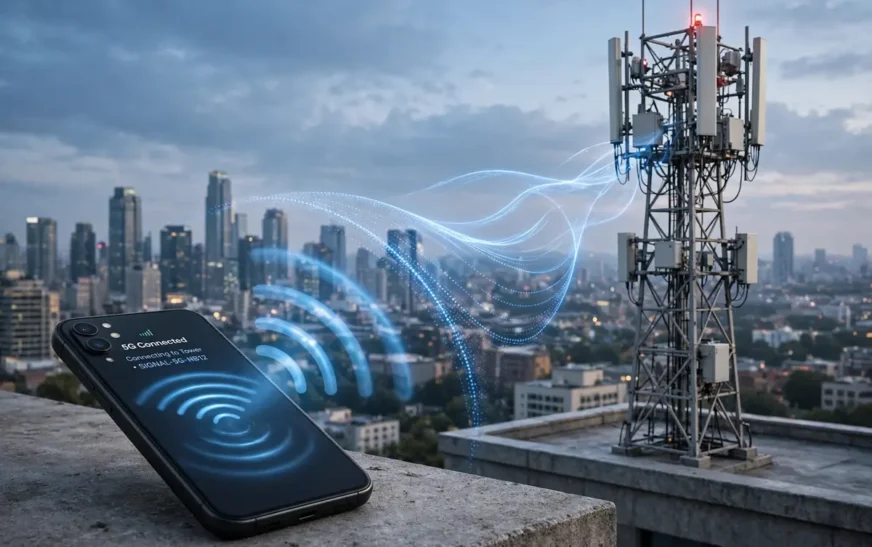
Quick answer: Your phone talks to a nearby cell tower using radio waves. The tower passes your data through cables to your carrier’s core network, which connects to the internet. A video, a message, or a web page travels back along the same path in reverse. Your SIM tells the network who you are and what plan you are on, and that is what the billing is based on.
Related reading: photo storage numbers
It is radio, not magic
Every explanation of mobile data should start with one plain fact: there is no wire between your phone and the internet. There is a radio link, over a short distance, to a tower or antenna that does have wires. Everything else — the speed, the coverage, the bill — follows from that one fact.
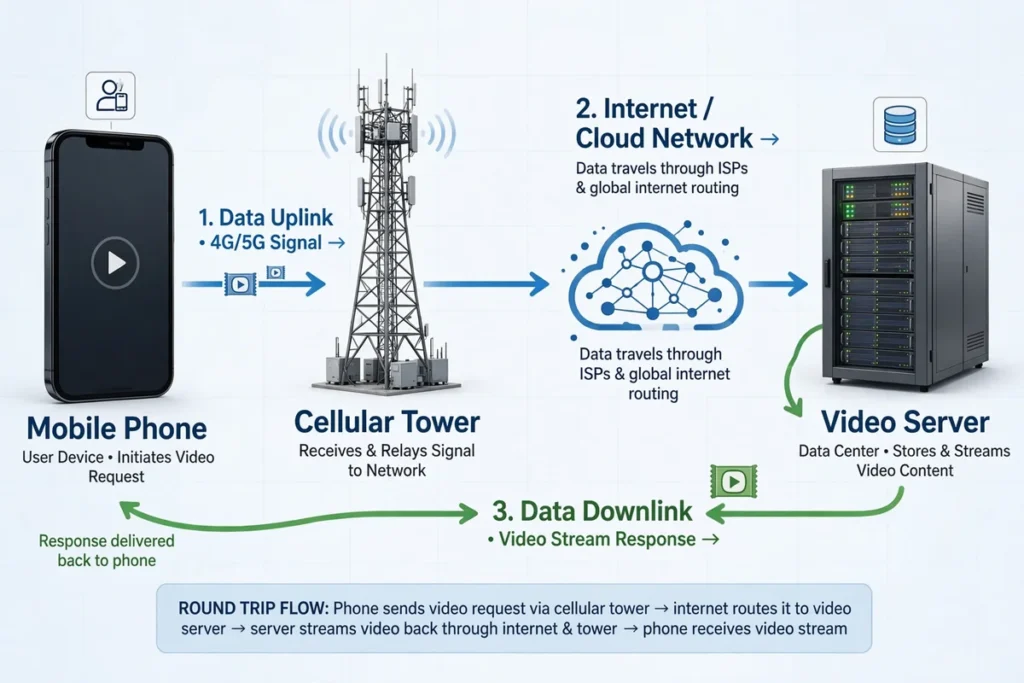
Your phone has a radio that speaks the same language as the tower. When you open a video, your phone does not fetch the video from the sky. It asks the tower, in radio, for the video. The tower forwards that request over cables, through your carrier’s network, to the internet, where a server sends the video back along the same route. The round trip happens in fractions of a second, thousands of times a minute, and the result feels instant, even though a lot of machinery is involved.
That radio link is also why mobile data behaves differently from home Wi-Fi. Wi-Fi covers a room or a house from a router a few metres away. Mobile data covers a neighbourhood or a stretch of road from a tower that might be hundreds of metres or several kilometres away, shared with hundreds or thousands of other people. Distance, obstacles, and sharing all affect what you get, and no phone setting can change the physics of that link.
Related reading: moving contacts to a new phone
Towers, cells, and why your signal bars lie a little
The word “cellular” comes from cells. A carrier divides an area into cells, each served by a tower or antenna site. Your phone connects to the cell that serves your current location, and as you move, it hands over from one cell to the next, ideally without you noticing. That handover is why you can take a call on a train: the phone is constantly measuring nearby cells and switching to the strongest one, in the background, while you talk.
Signal bars measure the strength of the radio link to the tower, not the speed you will get. A phone can show full bars on a crowded cell and still crawl, because the tower’s capacity is shared. A phone can show two bars on an empty cell and stream happily, because nobody else is competing for that capacity. Bars are a hint about the radio link. They are not a speed test, and treating them as one leads to a lot of confusion about why a “full signal” phone feels slow.
Obstacles matter more than people expect. Radio waves at the frequencies mobile networks use do not pass through everything equally. Buildings, hills, vehicles, and even heavy rain can weaken the signal. Indoors, the signal often arrives through windows and walls at reduced strength, which is why a phone works better near a window than deep inside a concrete building. Higher-frequency signals carry more data but travel shorter distances and penetrate buildings worse, which is why coverage and speed vary so much from street to street.
Small cells fill the gaps. In busy areas, carriers add small antennas on lamp posts, buildings, and rooftops to serve crowds that a big tower alone cannot handle well. At a stadium or a festival, those small cells are the difference between a working phone and a dead one. At home, a weak outdoor signal can sometimes be helped by a carrier-provided signal booster or by Wi-Fi calling, which routes calls and messages over your home internet instead of the mobile network.
Related reading: iPhone SOS meaning
What the SIM actually does
The SIM is a small identity card for the network. In a physical SIM, that identity lives on a chip in the card. In an eSIM, the same identity lives as software in the phone. Either way, the job is the same: prove to the network that this phone belongs to a paying customer, and say which customer, so the network knows what plan, what services, and what restrictions apply.
When your phone connects, it presents its SIM identity to the tower, and the carrier’s systems check it against your account. That check decides whether you get service at all, whether you can roam, how much high-speed data you have left, and whether your plan includes extras like hotspot use or international calling. The SIM does not store your photos or your messages. It stores identity and authentication keys, and that is enough for the network to bill the right person.
This is also why swapping a SIM into another phone moves your number and plan with it, while swapping phones without the SIM does not. The account follows the SIM, not the handset. And it is why losing a phone is a security issue: whoever holds the phone and its SIM can, in principle, receive your calls and messages until the carrier blocks the SIM. Reporting a lost phone to the carrier quickly, so the SIM can be suspended, matters more than most people realise.
Dual SIM phones hold two identities at once, and the phone lets you choose which line handles calls, messages, and mobile data. That choice matters for data, because data use is billed to the line you selected for mobile data, not to both lines. If your data bill looks wrong on a dual SIM phone, check which line is set for mobile data before anything else.
Related reading: wireless charger picks
The journey of a single tap
Follow one tap and the system becomes concrete. You tap a video. Your phone’s app asks the operating system for the video’s data. The operating system hands the request to the phone’s cellular radio, which encodes it into radio signals and sends it to the tower. The tower receives it, converts it back into wired data, and sends it through fibre or other backhaul links to the carrier’s core network.
The core network checks your SIM identity and your plan, then routes the request onto the internet, where it travels through a series of routers to the video company’s servers. The server sends the video back in small chunks called packets, which travel the same route in reverse: internet, core network, backhaul, tower, radio, phone. Your phone reassembles the packets in order, fills a small buffer so playback stays smooth if a packet is briefly delayed, and plays the video.
Every step adds a little delay, called latency. On a good connection, total latency is tens of milliseconds, which feels instant. On a congested or distant connection, it can rise into hundreds of milliseconds, which feels laggy even if the eventual speed is fine. Latency is why a video call can feel awkward on a connection that downloads files quickly: calls need low latency, while downloads mostly need high speed, and those are different qualities.
Packets can also be lost or arrive out of order, especially on a weak radio link. The system handles that by re-sending missing packets and reordering the rest, which costs a little time and a little extra data. A small amount of loss is normal and invisible. A large amount shows up as buffering, freezing, or robotic call audio, and it usually means the radio link is weak or the cell is overloaded.
Related reading: next-gen Wi-Fi explained
4G, 5G, and what the G actually means
The G stands for generation, and each generation is a new set of radio technologies, not just a faster version of the last one. 4G, known technically as LTE, brought fast, all-internet-protocol data, which is why modern apps assume a data connection is always available. 5G brings higher peak speeds, lower latency, and the ability to serve many more devices in the same area, though the real-world benefit depends heavily on which frequencies your carrier uses in your location and how close you are to a suitable antenna.
Higher frequencies carry more data but over shorter distances. Lower frequencies travel further and penetrate buildings better but carry less data. Carriers mix them: low frequencies for broad coverage, mid frequencies for a balance of speed and range in cities, and high frequencies for very fast, very short-range capacity in dense spots. When your phone shows 5G, it does not automatically mean you are on the fastest kind of 5G. It means you are connected to a 5G network, on whatever frequency that network gave you at that spot.
The practical consequence is that speed varies by location far more than by generation label. A good 4G connection in an empty cell can beat a congested 5G connection in a crowded one. A phone on the fastest 5G frequency next to a small cell can be spectacular, and the same phone two streets away, on a low frequency, can be ordinary. The label on the screen is a clue, not a promise.
Older generations still exist in the background for calls and for devices that need them, and carriers retire them gradually as newer networks take over. For a modern smartphone, the generations that matter day to day are 4G and 5G, and the difference you feel is usually about capacity and latency in your exact location, not about the number on the screen.
Related reading: free AI video tools
Why speed changes from street to street
Five things decide your speed at any moment: signal strength, cell load, frequency, backhaul, and the server at the other end. Signal strength is the radio link. Cell load is how many other people share your cell. Frequency is which band you are on. Backhaul is the wired link from the tower to the core network, which can itself be a bottleneck if it is congested or slow. And the server matters because a slow or distant server limits you no matter how good your connection is.
Time of day is a proxy for cell load. A cell serving a business district is busiest in working hours and quiet at night. A residential cell is busiest in the evening, when everyone streams video at once. A stadium cell is quiet all week and slammed for three hours on match day. If your data is slow every evening but fine at midday, load, not your phone, is the likely cause, and no phone setting will fix a crowded cell.
Weather and terrain play a smaller but real role. Heavy rain can weaken higher-frequency signals. Hills and buildings block and reflect signals, creating dead spots and patches of interference. Moving at speed adds handovers, and each handover is a moment where the phone switches cells, which can briefly interrupt data. None of this means your phone is faulty. It means radio is physical, and physical things have limits.
Your phone’s own state matters too. A phone with a weak battery in a power-saving mode may limit background data and reduce performance. A phone with many apps syncing at once splits its attention. A phone connected to a weak Wi-Fi network while also having mobile data on may behave oddly if it keeps switching between the two. Checking the simple things first — signal, load, and what else the phone is doing — solves more speed mysteries than any advanced setting.
Related reading: checking a motherboard model
How carriers count, limit, and bill data
Carriers count data at their network equipment, in units of megabytes and gigabytes, and they count everything that travels over the mobile network for your line: app data, system updates, hotspot data for connected devices, and the small overhead of the protocols themselves. They do not count Wi-Fi data, because Wi-Fi data never touches their mobile network. That distinction is the whole reason Wi-Fi is free in data terms and mobile data is not.
Plans set an allowance, usually per billing month, and what happens when you exceed it depends on the plan. Some plans charge per extra gigabyte. Some slow you down to a much lower speed for the rest of the month. Some stop high-speed data entirely until the next month or until you buy a top-up. Plans marketed as unlimited often still have a threshold after which speeds are reduced, a practice called deprioritisation or throttling, where your traffic gets lower priority than other customers’ traffic during congestion. Read the threshold and the throttling terms, because they decide what “unlimited” feels like in the last week of the month.
Roaming adds another layer. When you travel, your phone may connect to a partner carrier’s network instead of your own carrier’s towers. That partner charges your carrier, and your carrier passes some or all of that cost to you, under roaming terms that vary widely by plan and destination. Data roaming can be switched off separately from mobile data, and leaving it off while travelling is the safest default unless you have checked your roaming terms first.
Hotspot data is usually counted against the same allowance, but some plans treat it separately, with its own smaller allowance or its own speed limit. Check your plan’s hotspot terms before relying on a hotspot for work, because a plan with generous phone data and a small hotspot allowance will surprise you exactly when you need it most.
Related reading: deleting a Telegram account
Mobile data versus Wi-Fi, honestly compared
Wi-Fi wins on cost, because home and office internet is usually unmetered or generously capped, and it wins on speed indoors, because the router is close and the connection is not shared with a neighbourhood. Mobile data wins on coverage, because it follows you everywhere there is a tower, and it wins on simplicity, because it needs no password, no router, and no setup beyond a SIM and a plan.
The smart approach is not to pick one, but to use each where it is strong. Use Wi-Fi for big downloads, updates, backups, and video at home. Use mobile data for maps, messaging, and light browsing on the move. Let the phone switch automatically, but watch for the weak-Wi-Fi trap, where a weak Wi-Fi signal keeps the phone clinging to a bad connection instead of switching to mobile data, or a Wi-Fi assist feature quietly uses mobile data to prop up a weak Wi-Fi link. Both behaviours are configurable, and both are worth checking if your data or your patience runs out unexpectedly.
Wi-Fi calling is a useful bridge between the two. It routes calls and messages over Wi-Fi when the mobile signal is weak, using your phone number as normal. It does not use your mobile data allowance, because the traffic travels over Wi-Fi, and it can rescue a phone that has no usable mobile signal indoors. If your home has good Wi-Fi and poor mobile coverage, Wi-Fi calling is worth switching on.
Related reading: AI chip news
What you can actually control
You cannot control tower load, frequency, or backhaul. You can control three things that matter: which network your phone prefers, how your apps behave, and how much data you use. Choosing between 4G and 5G in settings rarely helps, because the phone already picks the best available cell, but forcing a lower generation can sometimes stabilise a flaky connection, at the cost of speed, and it is worth trying if your connection keeps dropping.
App behaviour is the bigger lever. Restricting background data, setting downloads and updates to Wi-Fi only, lowering streaming quality on mobile, and cutting mobile access for apps that do not need it, all reduce the load your phone puts on the network, which improves both your bill and your experience on a crowded cell. A phone that asks for less gets more of what it asks for, because it is not competing with itself.
Usage is the lever that decides the bill. Knowing how much data each activity uses, measuring your real monthly total, and sizing your plan to that total, turns mobile data from a mystery into a budget. A calculator helps here, because it turns vague habits into a number.
To turn your own habits into a monthly figure, try the data usage calculator on CripsyWire, which estimates monthly use from daily activities and suggests a plan size.
Related reading: Mac charging check
FAQ
How does mobile data work in simple terms?
Your phone sends and receives radio signals to a nearby cell tower. The tower connects through cables to your carrier’s network and then to the internet. Your SIM identifies you to the network so the carrier knows whose plan to bill.
Why is my mobile data slow with full signal bars?
Bars measure radio signal strength, not speed. A crowded cell, a slow backhaul link, or a slow server can all make a full-signal connection feel slow, because speed depends on shared capacity, not just signal strength.
What is the difference between 4G and 5G?
They are different generations of radio technology. 5G can offer higher peak speeds, lower latency, and more capacity in dense areas, but real-world speed depends on frequency, cell load, and location, so a good 4G connection can beat a congested 5G one.
Does Wi-Fi calling use mobile data?
No. Wi-Fi calling routes calls and messages over a Wi-Fi internet connection, so it does not count against your mobile data allowance. It is useful where mobile signal is weak but Wi-Fi is good.
Why does my carrier show more data than my phone?
Carriers count data at their network equipment, including protocol overhead, and over their own billing period. Hotspot use, period differences, and overhead all create small gaps, and large persistent gaps are worth querying with dated records.
Does turning off mobile data stop all data use?
It stops mobile network data. Your phone can still use Wi-Fi, and apps can still use data over Wi-Fi. To stop all data, turn off both mobile data and Wi-Fi, or use airplane mode.
Related reading: iPhone battery replacement
The short version
Mobile data is a radio link to a tower, a wired journey through your carrier’s network to the internet, and a SIM that says who pays. Signal bars measure the radio link, not the speed. Speed depends on signal, cell load, frequency, backhaul, and the server. Control what you can — app behaviour and usage — and let the tower handle the rest.
More practical guides live on the CripsyWire blog.
The site itself is at CripsyWire.
For background on who runs it, see the about page.
See what your habits add up to
Turn your daily streaming, calls and browsing into a monthly data total and a plan size that fits.

Continue Reading on CripsyWire
For more practical AI coverage for US buyers, see our full AI tools and agents library. When you are deciding between competing tools, the reviews and comparisons section breaks down head-to-head matchups. AI features that live inside your phone are tracked in smartphones, and AI on your wrist or finger in wearables. All of this is part of CripsyWire's broader Tech coverage — start at the homepage for what is newest.