Quick answer: Split a UUID into five groups, read the first character of the third group for its version, and read the first character of the fourth group for its variant. If the version is 1, 6, or 7, the opening digits carry a timestamp you can convert to a real date and time. If the version is 4 or 5, there is no timestamp to recover — the rest is random bits or a hash, and any tool claiming to show its creation time is guessing.
A UUID looks like random punctuation until you know the two positions that matter. This guide gives the manual method: the digits to read, the conversions for versions 1, 6, and 7, and the hard limits for versions 4 and 5.
If you want a fresh ID to practise on, generate one with CripsyWire’s UUID tool and work through the steps below with it in front of you.
What a UUID actually is
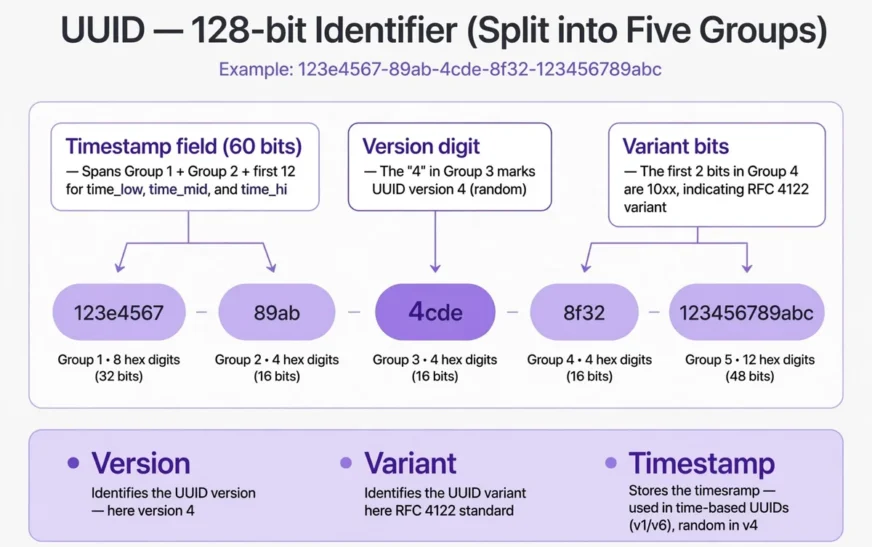
A UUID is a 128-bit identifier, usually written as 32 hexadecimal characters in five groups separated by hyphens: 8-4-4-4-12. Each hex character holds 4 bits, so 32 times 4 gives the full 128 bits. The hyphens carry no data; they let humans read the string and spot the group boundaries.
The current standard is RFC 9562, published in May 2024, which obsoletes the older RFC 4122. RFC 9562 keeps the familiar versions and adds versions 6, 7, and 8, plus the Max UUID. The rules below follow RFC 9562, and they explain why a decoder can be honest about some versions and must refuse to invent answers for others.
Think of a UUID as a fixed-size record, not an encrypted message. Nothing in it is encrypted: some versions pack a timestamp in a published layout, others pack random bits or a hash. Decoding means reading the layout the version digit declares. A timestamped ID can tell you when a record was created; a non-timestamped ID cannot, however confident a web page sounds.
The same check-first habit applies when you check a motherboard model.
The anatomy: five groups, two positions that matter
Keep this example in view: 019bc186-de00-7abc-8def-0123456789ab
| Group | Characters | Contents here |
|---|---|---|
| 1 | 019bc186 |
First 8 hex digits |
| 2 | de00 |
Next 4 hex digits |
| 3 | 7abc |
Version digit 7, then 3 more digits |
| 4 | 8def |
Variant bits in 8, then 3 more digits |
| 5 | 0123456789ab |
Final 12 hex digits |
Two characters do most of the work: group 3’s first character is the version digit, group 4’s first is the variant. The rest is timestamp, clock sequence, node, random bits, or hash, depending on version.
Do not read the timestamp from the wrong end. Version 7 puts it first (first 12 hex digits); version 1 scatters it across groups 1, 2, and group 3’s tail; version 6 reorders it for sorting. The version digit picks the layout, so read it first.
Case does not matter, but leading zeros do: 019bc186de00 differs from 19bc186de00 with the zero dropped. Keep every digit when you copy an ID.
Step 1: read the version digit
The version digit is the first character of the third group:
1— time-based, Gregorian timestamp plus clock sequence and node2— DCE Security, rarely seen outside specialised systems3— name-based, MD5 hash of namespace plus name4— randomly generated, 122 random bits plus 6 fixed bits5— name-based, SHA-1 hash of namespace plus name6— time-based, reordered version 1 for better sorting7— time-based, Unix millisecond timestamp plus random bits8— custom, free-form use defined by the application
If the digit is 0 or f, treat the ID with caution: it may be Nil/Max (below), non-standard, or truncated.
In 019bc186-de00-7abc-8def-0123456789ab, group 3 is 7abc, so the version is 7, and the first 12 hex digits are a Unix millisecond timestamp. In f47ac10b-58cc-4372-a567-0e02b2c3d479, group 3 is 4372, so the version is 4, and no timestamp is stored. Same length, same shape, opposite answers — the version digit separates them.
The CripsyWire tools hub states one job per tool up front; a decoder should state its version before its date.
Step 2: read the variant bits
The variant lives in the most significant bits of the first character of group 4:
0to7— reserved, NCS backward compatibility8,9,a, orb— the RFC 9562 / RFC 4122 variant, the one in almost every modern systemcord— reserved, Microsoft GUID compatibilityeorf— reserved for future use
The reason is binary: the RFC variant fixes the top two bits to 10, so the digit can only be 8, 9, a, or b.
In our example group 4 is 8def (standard); in the version 4 example it is a567 (also standard). Same variant, different version — read both digits.
If group 4 starts with c, d, e, or f, stop and check the source system: another variant may use a different layout, and RFC rules could give a plausible but wrong date.
A guide to fixing a slow DNS lookup isolates one stage at a time; decoding does the same.
Step 3: what each version stores
- Version 1: 60-bit timestamp (100-nanosecond intervals since 15 October 1582), plus 14-bit clock sequence and 48-bit node. The node was historically a MAC address — the privacy leak RFC 9562 flags.
- Version 6: same 60-bit Gregorian timestamp, clock sequence, and node as version 1, reordered so the most significant bits come first. It sorts in time order; version 1 does not.
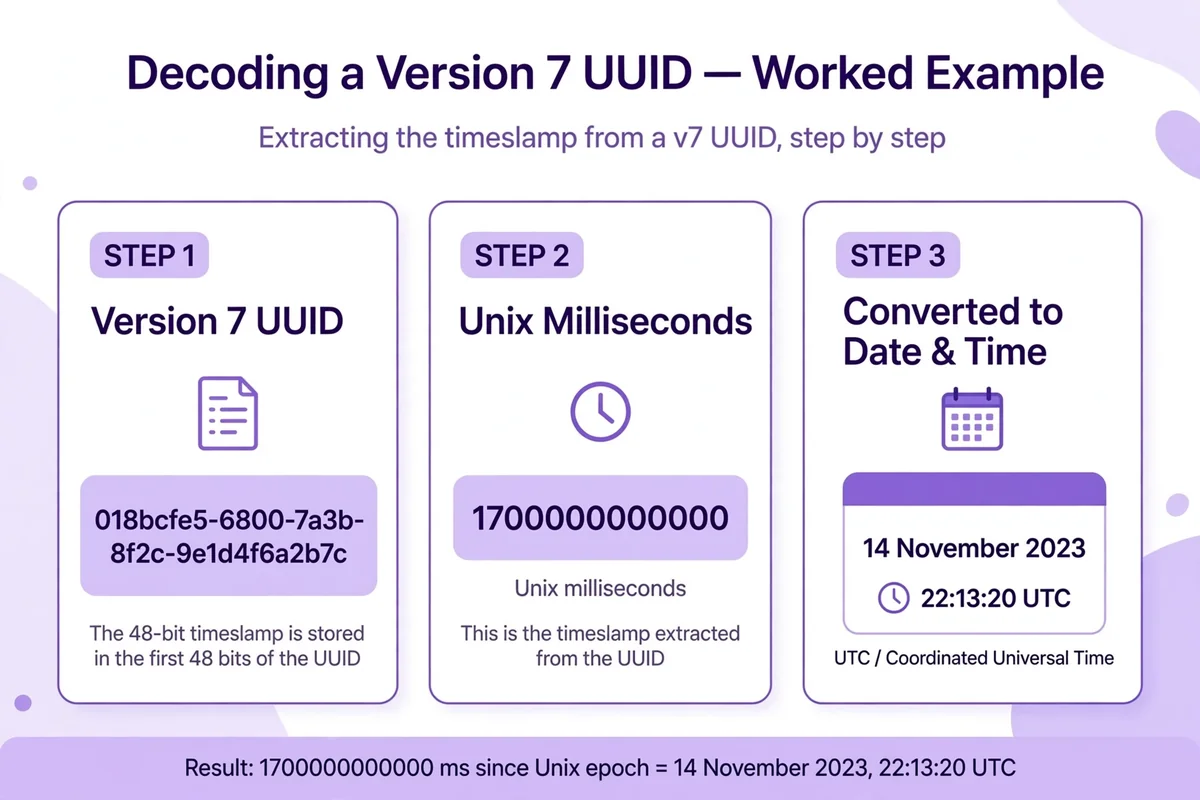
- Version 7: 48-bit Unix millisecond timestamp, counting milliseconds since 1 January 1970, followed by version digit and random bits. No clock sequence, no node, no MAC address.
- Version 4: 122 random bits. No timestamp, no name, no node. Nothing to convert.
- Version 5: SHA-1 hash of a namespace ID plus a name, stamped with version and variant bits. Same input always gives the same ID, but the name cannot be recovered.
- Version 3: the same idea as version 5, using MD5 instead of SHA-1. Deterministic, and equally one-way.
- Version 8: custom layout, defined by the creating application.
If someone asks what date a version 4 ID was created, the honest answer is that it does not store one. If they ask about version 7, the honest answer is a conversion you can check by hand.
The phone storage calculator turns a vague fit question into a number, just as hex conversion turns a timestamp field into a date.
Worked example 1: version 1
Constructed version 1 ID, built for a known moment so the result can be checked: aced2400-deea-11ee-8abc-00155d012345
- Version: group 3 is
11ee, so version1. - Variant: group 4 is
8abc, starting with8, so standard. - Reassemble the timestamp: group 1 holds the low 32 bits, group 2 the next 16, group 3’s last three characters the top 12. Here:
aced2400,deea,1ee— top first:1ee+deea+aced2400=1eedeeaaced2400. - Convert hex to decimal:
0x1eedeeaaced2400equals 139,293,738,000,000,000, counting 100-nanosecond ticks. - Convert ticks to seconds: divide by 10,000,000 ticks per second, giving 13,929,373,800 seconds after 15 October 1582.
- Convert to a date: adding that interval to 15 October 1582 gives 10 March 2024 at 14:30:00 UTC.
The clock sequence sits in the tail of group 4 (abc here); the node, 00155d012345, occupies group 5. In an older real version 1 ID that node could be a MAC address — the privacy leak RFC 9562 warns about.
Watch the epoch: version 1 counts from 1582, not 1970. Feeding its ticks into a Unix converter lands centuries out.
Worked example 2: version 6
Version 6 keeps the version 1 timestamp, clock sequence, and node, but reorders the timestamp so the ID sorts correctly. Built from the same moment as above, 10 March 2024 at 14:30:00 UTC: 1eedeeaa-ced2-6400-8abc-00155d012345
- Version: group 3 is
6400, so version6. - Variant: group 4 is
8abc, starting with8, so standard. - Read the timestamp in order: group 1 holds the top 32 bits (
1eedeeaa), group 2 the next 16 bits (ced2), and the last three characters of group 3 the lowest 12 bits (400). Joined in order:1eedeeaa+ced2+400=1eedeeaaced2400, the same 60-bit value as the version 1 example. - Convert as before:
0x1eedeeaaced2400is 139,293,738,000,000,000 ticks since 15 October 1582, which is 10 March 2024 at 14:30:00 UTC.
Both examples giving the same moment confirms the reordering. A different date usually means a version 6 ID read with version 1 field order, or the reverse.
Version 6 suits systems already built on version 1 ticks that want sortability without changing resolution or epoch. Version 7 is cleaner for new systems.
Worked example 3: version 7
Version 7 is the easiest to decode by hand, one reason it has spread fast since RFC 9562. Example: 019bc186-de00-7abc-8def-0123456789ab
- Version: group 3 is
7abc, so version7. - Variant: group 4 is
8def, starting with8, so standard. - Read the timestamp: the first 12 hex digits, groups 1 and 2 joined, are
019bc186de00. That is the whole timestamp. No reassembly. - Convert hex to decimal:
0x019bc186de00equals 1,768,478,400,000. - Convert milliseconds to a date: that counts milliseconds since 1 January 1970. Divide by 1,000 to get 1,768,478,400 seconds, which is 15 January 2026 at 12:00:00 UTC.
The rest is random bits, apart from fixed version and variant bits. It carries no date, name, or node; it keeps IDs unique within the same millisecond.
Second check: 019a43cb-7a80-7abc-8def-0123456789ab starts with 019a43cb7a80 = 1,762,074,000,000 ms, or 2 November 2025 at 09:00:00 UTC. A 1970 or far-future result usually means hex read as decimal, milliseconds fed as seconds, or version 7 ticks treated as Gregorian.
Because the timestamp leads, version 7 IDs sort roughly in creation order at millisecond resolution; within one millisecond the random tail decides order.
What cannot be decoded: versions 4 and 5
Version 4: random bits, no date
Classic version 4 example: f47ac10b-58cc-4372-a567-0e02b2c3d479
Version digit 4, variant a, rest random. No timestamp, node, or name to recover. A decoder outputting a creation date for this ID is inventing one.
That limit is a feature: version 4 reveals nothing about when, where, or from what name it was made. The trade-off is sorting — random leading bits land new IDs anywhere in an index. With 122 random bits, collisions are theoretical long before they are practical.
Version 5: a hash, not a container
Version 5 IDs are deterministic: the same namespace plus name into SHA-1 always gives the same ID, useful for stable references with no lookup table.
Determinism runs one way only: SHA-1 cannot be reversed to its name. You can test a guess by hashing it and comparing, but you cannot extract an unknown name. Version 3 works the same way with MD5, so store the name separately if you need it later.
When you transfer contacts to a new phone, the record travels with its fields; a bare ID travels alone.
Nil, Max, and the special cases
- Nil UUID:
00000000-0000-0000-0000-000000000000— all 128 bits zero. It means “no ID” or “not set”, not a version 0 timestamp. Do not decode a date from it. - Max UUID:
ffffffff-ffff-ffff-ffff-ffffffffffff— all 128 bits one. Added by RFC 9562 as the opposite sentinel. It carries no timestamp either, and its version and variant digits arefby construction, not by assignment.
If a decoder returns a date for either sentinel, it is misapplying timestamp arithmetic. Check for all-zero/all-one strings before checking version.
Version 8 is custom: the application defines the layout, and RFC 9562 only reserves version and variant positions. Without that spec, a generic decoder cannot say what the remaining bits mean.
The AI image prompt examples show a precise spec gives a predictable output; a version 8 ID without its spec is the vague-prompt case.
Mistakes that produce confident wrong answers
- Reading hex as decimal.
019bc186de00contains letters, yet a converter dropping non-numeric characters will still return a number. Confirm it accepts hex first. - Mixing up epochs. Versions 1 and 6 count from 1582; version 7 from 1970. Swapping them moves the answer by centuries.
- Forgetting the millisecond division. Version 7 timestamps are milliseconds, not seconds. Divide by 1,000 first.
- Dropping leading zeros. A version 7 timestamp starting with
0is still 48 bits wide. Dropping it shortens the value and shifts every later digit. - Reading version 1 in version 6 order. Version 1 scatters its timestamp; version 6 leads with it. The wrong order gives a plausible but wrong date. Let the version digit pick the order.
- Trusting the node as a location. A version 1 node may be a MAC address, a random value, or a stale cloned value — not proof of origin.
- Assuming case or hyphens change the value. They do not. What changes the value is dropping, adding, or swapping a hex digit.
If a date looks wrong, re-run it with a second converter and compare the raw hex first; most errors show up there.
The guide on why a phone overheats separates app load from charging heat before blaming the battery; decoding separates version from timestamp before blaming the converter.
A manual decoding checklist
- Confirm 32 hex digits in a 8-4-4-4-12 pattern, ignoring hyphens and case.
- Rule out Nil (
00000000-0000-0000-0000-000000000000) and Max (ffffffff-ffff-ffff-ffff-ffffffffffff). - Read group 3, first character: that is the version.
- Read group 4, first character:
8,9,a, orbmeans the standard variant. - Version 1 or 6: reassemble the 60-bit Gregorian tick count in that version’s order, convert from 15 October 1582.
- Version 7: read the first 12 hex digits as Unix milliseconds, convert from 1 January 1970.
- Version 4: stop — randomly generated, no date stored.
- Versions 3 or 5: stop — a hash of a name, not reversible to that name.
- Version 8: stop and find the application’s spec before claiming any field meaning.
- Sanity-check the result: does the date fall in a plausible range for the creating system? A 2026 date from a system built in 2019 deserves a second look.
A data usage calculator keeps numbers honest the way this checklist keeps a decode honest.
Frequently asked questions
Can a UUID decoder tell me when any UUID was created?
No. Only versions 1, 6, and 7 store a timestamp. Versions 4 and 5 do not, versions 3 and 8 store no recoverable creation time in the standard layout, and Nil and Max are sentinels.
How do I tell version 7 apart from version 1 at a glance?
Read the first character of the third group. 7 means version 7 (first 12 hex digits = Unix milliseconds); 1 means version 1 (timestamp scattered across groups 1, 2, and 3 in Gregorian ticks since 1582).
Why does version 1 raise a privacy concern?
Version 1 can embed a MAC-derived node alongside a precise timestamp, revealing a hardware identifier and exact creation moment. RFC 9562 notes this; new systems favour version 7, which carries no node.
Is a version 7 UUID sortable by creation time?
Roughly, yes, at millisecond resolution. The timestamp leads, so later IDs generally sort after earlier ones; within one millisecond the random tail decides order.
Can I recover the original name from a version 5 UUID?
No, not from the ID alone. Version 5 is a one-way SHA-1 hash of namespace plus name. You can test a guessed name by hashing and comparing, but cannot extract an unknown name.
What if the variant digit is not 8, 9, a, or b?
Pause before decoding. 0–7 indicates an older NCS variant, c/d Microsoft GUID compatibility, e/f reserved. The rules here assume the RFC variant; check the source system first.
Where this fits in real work
Decoding is a diagnostic step: confirming when a record was made, tracing a duplicate, or checking whether an ID came from the expected generator. A batch that should be all version 7 but contains version 4 entries points to mixed generators; a version 1 ID in a version 7 system points to a legacy path never switched off.
Pick deliberately: version 7 for time order, version 4 for privacy, version 5 for stable names. Picking by habit leaks timestamps or scatters index rows.
Knowing how to know if a Mac is charging prevents a dead-battery surprise, just as reading the version digit prevents a wrong-date surprise.
For a broader view, start at the CripsyWire homepage.
Browse the blog for the latest guides.
The about page states the site’s approach in plain terms.
Make an ID, then take it apart
Create a fresh UUID and run it through the checklist above — version first, variant second, timestamp only if the version stores one.

Continue Reading on CripsyWire
For more practical AI coverage for US buyers, see our full AI tools and agents library. When you are deciding between competing tools, the reviews and comparisons section breaks down head-to-head matchups. AI features that live inside your phone are tracked in smartphones, and AI on your wrist or finger in wearables. All of this is part of CripsyWire's broader Tech coverage — start at the homepage for what is newest.