A pasted identifier either follows the UUID rules or it does not. There is no almost-valid category a database, API, or log parser will quietly accept. Knowing what validation tests — and what it cannot test — saves hours of debugging bad imports and failed requests.
If you need a fresh identifier after checking one, you can use the UUID generator tool on CripsyWire to create a new value, then run it through the same checks described here.
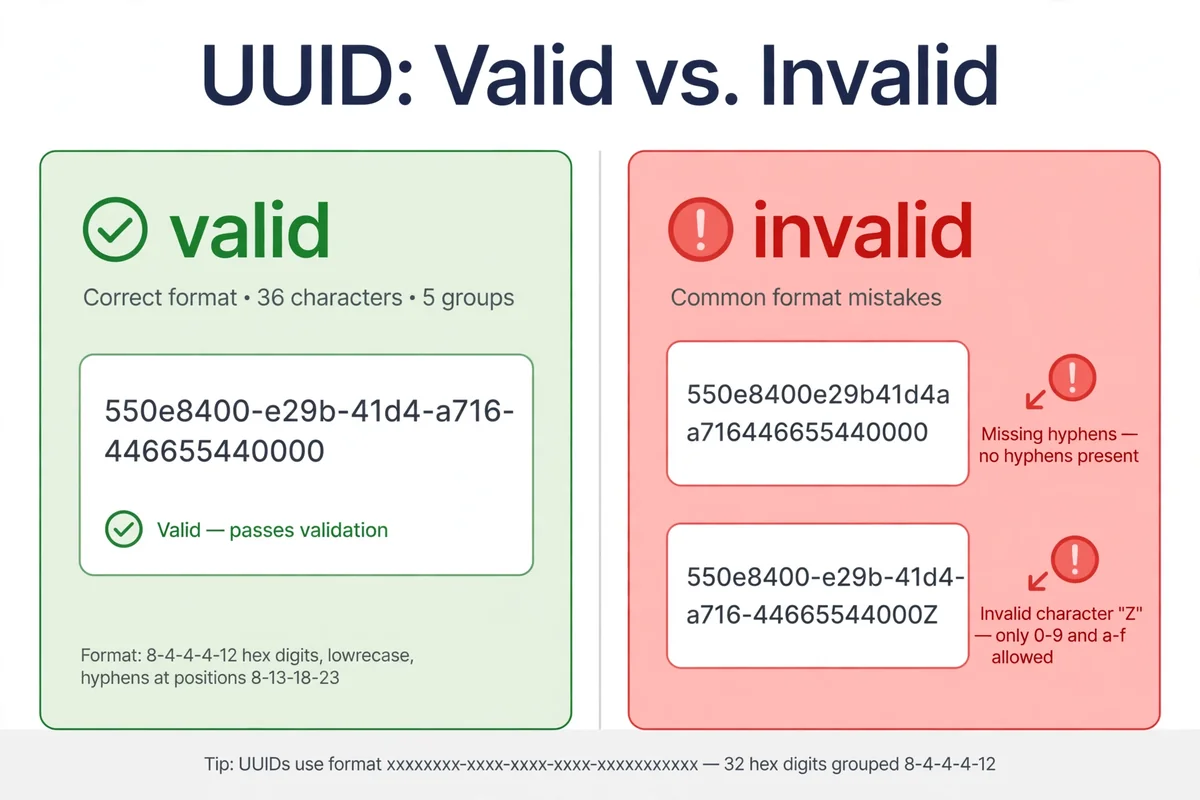
Quick answer: A valid UUID is 128 bits written as 32 hexadecimal characters in five groups separated by hyphens: 8-4-4-4-12, for 36 characters in total. The first character of the third group is the version digit, and the first character of the fourth group must show the variant bits — for the common variant, that character is 8, 9, a, or b. A strict check enforces format, version, and variant. A loose check enforces only format.
What a UUID Is
A UUID, or Universally Unique Identifier, is a 128-bit value. That size gives an enormous space of possible values, which is why UUIDs work as identifiers across systems that never talked before exchanging data, provided generation uses enough randomness or a sound mix of time, namespace, and name.
The familiar text form is not the value itself, only a readable encoding of those 128 bits. Each hex character represents 4 bits, so 32 hex characters represent 128 bits. Hyphens only mark group boundaries. Some systems store UUIDs as 16 raw bytes, some with braces, some without hyphens. A validator must decide which forms it accepts — that decision is where most arguments about “valid” come from.
The current standard is RFC 9562, published in May 2024. It obsoletes RFC 4122, the earlier specification most developers still cite. The basic text format did not change in a breaking way, but RFC 9562 clarifies versions, adds versions 7 and 8, and updates privacy guidance. For new work, RFC 9562 is the correct reference.
For general tech background, the CripsyWire homepage is the starting point for the site’s tools and explainers.
The Format Rule: 8-4-4-4-12
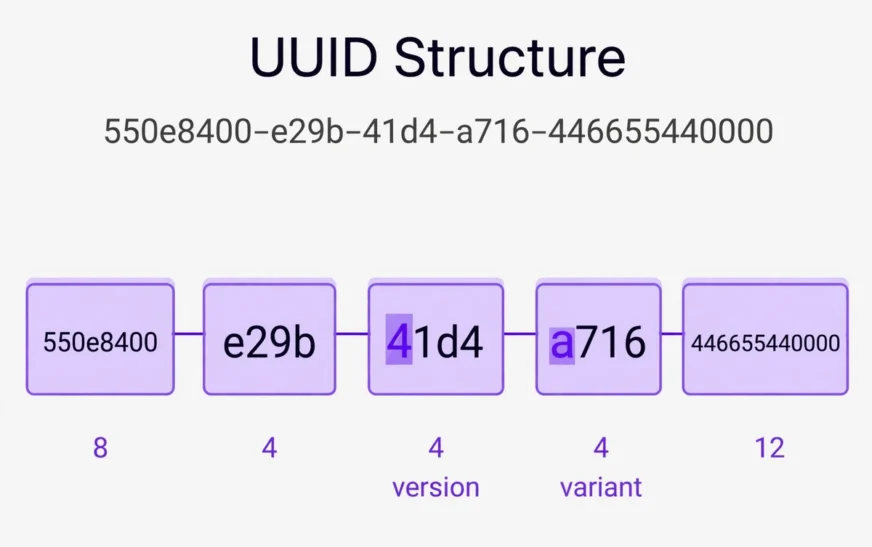
The canonical text form has five groups: 8 hex characters, then 4, then 4, then 4, then 12. That is 32 hex characters plus 4 hyphens, or 36 characters in total. A typical version 4 value looks like this:
550e8400-e29b-41d4-a716-446655440000
Count the groups and you get 8, 4, 4, 4, and 12. Count the whole string, hyphens included, and you get 36. Either count is a fast first check, and either count catches many broken values before deeper logic runs.
Hex means digits 0 through 9 and letters a through f. Uppercase A through F are also hex, and most validators accept both, because case does not change the bits. A letter outside that range — g, z, or any other character — fails at once, as do spaces, underscores, dots, and stray characters copied from a chat message or PDF.
Hyphen position is part of the format, not decoration. A string with 32 hex characters but hyphens in the wrong places is not in canonical form. Some tools accept the no-hyphen form and normalize it; that is reasonable, but it should be stated openly. A validator silently accepting every hyphen arrangement is validating the character set, not canonical format.
The Version Digit
The version digit is the first character of the third group. It states which generation method the value claims to follow:
| Version | Meaning |
|---|---|
| 1 | Timestamp plus node identifier |
| 2 | DCE Security, rarely used |
| 3 | MD5 hash of namespace plus name |
| 4 | Randomly generated, 122 random bits |
| 5 | SHA-1 hash of namespace plus name |
| 6 | Reordered timestamp variant of version 1 |
| 7 | Unix millisecond timestamp plus random bits |
| 8 | Custom or experimental |
A version-checking validator rejects a third-group digit outside its allowed list. A format-only validator accepts any hex digit there, including 0, not a defined version for ordinary use. They answer different questions: “Is this a version I recognize?” versus “Is this shaped like a UUID?”
Version 4 is the one most people meet first. It uses 122 random bits, with 6 bits fixed by version and variant. That is why a version 4 value always has a 4 at the start of its third group and an 8, 9, a, or b at the start of its fourth group. If either differs, it is not a well-formed version 4 UUID.
Version 7 is time-ordered. It starts with a Unix timestamp in milliseconds, followed by random bits, so version 7 values are roughly sortable by creation time. That is why version 7 is often preferred for database indexes, where increasing keys avoid scattered writes from purely random keys. A validator need not decode the timestamp, but a stricter tool can confirm it is plausible.
Version 1 uses a timestamp plus a node value. Originally that node was often a MAC address, which leaks hardware identity; RFC 9562 flags that privacy problem and recommends random nodes instead. A validator cannot tell from the string alone which kind was used.
Version 5 is built from a namespace plus a name, hashed with SHA-1. The same inputs always produce the same value, suiting stable derived identifiers. Validation checks format, version, and variant; it does not recompute the hash.
Two special values sit outside the version system. Nil is all zeros: 00000000-0000-0000-0000-000000000000. Max is all ones in hex: ffffffff-ffff-ffff-ffff-ffffffffffff. Both are defined in RFC 9562. A validator may accept them as special cases or reject them; document the choice, because code treating Nil as “no value” behaves differently from code treating it as a real key.
The Variant Bits
The variant is less famous than the version, and it causes more quiet failures. For the RFC 9562 variant, the first character of the fourth group must be 8, 9, a, or b — the hex values whose top bits are 10 in binary.
A value can have perfect groups, length, and version digit, and still fail variant validation. Take this example:
550e8400-e29b-41d4-c716-446655440000
The only change from the earlier example is the fourth group’s first character, from a to c. A loose check passes it. A strict check fails it, because c starts with bits 11, belonging to a different variant family reserved for future use, not the RFC 9562 variant. Sending it to a system enforcing the variant produces a rejection that looks mysterious if you only counted characters.
How Validation Works, Step by Step
A sound validator checks in order, cheapest first, so its error points at the actual problem.
Step 1: Trim and reject emptiness. An empty or whitespace-only string is not a UUID. Trimming outer spaces is fair in a form, but the result must still pass every later step. Trimming inner spaces hides corruption.
Step 2: Check length and hyphen positions. Canonical form is 36 characters, with hyphens at positions 9, 14, 19, and 24 counting from 1. If length is wrong, stop here; “wrong length” tells the user far more than a generic “invalid” flag.
Step 3: Check the character set. Every non-hyphen character must be a hex digit. This catches letters beyond f, punctuation, look-alike dashes from formatted text, and braces or quotes only half removed.
Step 4: Check the version digit. Read the first character of the third group and compare it with the allowed list, or one specific version if only that version is enforced. If no version is enforced, say so.
Step 5: Check the variant. Read the first character of the fourth group. For the RFC 9562 variant it must be 8, 9, a, or b. This is the step most hand-written checks skip, because they copied a pattern checking only groups and length — why many “validated” UUIDs later fail at the database layer.
Step 6: Apply policy on special values and case. Decide whether Nil and Max are accepted, whether uppercase is normalized to lowercase, and whether no-hyphen or braced forms are normalized. State these choices, so calling code knows the stored value may differ from the typed value.
Tools that do one job well are worth keeping separate. A phone storage calculator answers a capacity question, not an identity question, and mixing jobs into one check is how vague errors are born.
Strict vs Loose Validation
Strict and loose are not synonyms for good and bad. They are different contracts, and the right one depends on where the check sits.
Loose validation asks: does this string have the shape of a UUID? It checks length, hyphen positions, and hex characters. It suits a first-pass form check, log parsing, and migration code accepting historical variants. Its weakness is passing values a downstream system will reject, moving failure later, where it is harder to explain.
Strict validation asks: does this string follow the full rules for a specific version and variant? It adds version and variant checks, plus a decision about Nil and Max. It suits an API boundary and any point before database insert. Its weakness is rejecting historical values loose code would accept, so never apply it retroactively to old data without a migration plan.
A common middle path is strict-by-version: accept any recognized version, but require the variant to match. That rejects the c-variant example while accepting versions 1, 4, 5, 6, and 7, catching the most common corruption without tying the API to one method.
Whichever contract you choose, name it in the error message. “Invalid UUID” tells a user nothing. “Invalid UUID: variant must be 8, 9, a, or b” tells the user exactly which character to fix.
The same principle applies elsewhere. A data usage calculator is useful only when it states its assumptions, and a validator is useful only when it states its contract.
Common Invalid Examples
Each broken value below differs from a valid value in one clear way: one character changed in copying, one group shortened by a careless edit, or one wrapper left in place.
| Broken value | What is wrong |
|---|---|
550e8400-e29b-41d4-a716-44665544000 |
35 characters; last group has 11, not 12 |
550e8400e29b-41d4-a716-446655440000 |
First hyphen missing; groups are 12-4-4-12 |
550e8400-e29b-41d4-a716-44665544000g |
Contains g, not a hex digit |
{550e8400-e29b-41d4-a716-446655440000} |
Braces included; canonical form has none |
550e8400-e29b-41d4-c716-446655440000 |
Variant c, not 8, 9, a, or b |
550e8400-e29b-01d4-a716-446655440000 |
Version digit 0, not recognized |
Two patterns deserve extra attention. First, en dashes: word processors often replace a hyphen with a longer dash that looks identical at normal zoom, so a message naming the dash helps more than “non-hex character.” Second, a dropped hex digit leaves the string plausible; only a group count gives it away.
If you write documentation with example identifiers, keep the examples clearly fake. An AI image prompt builder benefits from the same discipline: examples should be obviously illustrative, never copied from real user data.
What Validation Cannot Tell You
A passing result proves shape and, under strict rules, version and variant. It does not prove existence, uniqueness, secure generation, ownership, or honest timestamps. A well-formed value can point at no record, duplicate an existing key, come from a weak random source, or be presented by someone who does not own the record.
Treating a format pass as proof of existence or ownership is a security error. APIs must still check access to the named record, and import jobs must still check for duplicates, even when every row passes format validation.
Validation also cannot repair a value. If one character is wrong, no validator can know which was intended, and guessing risks pointing at a different record. Report the error, show its position when possible, and ask for the source value again.
Where Validation Sits, and How to Fix a Failure
In a web form, validation runs twice: in the browser for feedback, and on the server for authority. Browser checks can be bypassed, so the server check protects the data. In an API, validation belongs at the boundary, before business logic. In a database, a native UUID column is the last defense, rejecting malformed values at insert, while a plain text column accepts anything. In migration, validation belongs in staging, with a report listing every invalid value and its failure.
When a value fails, work in order instead of retyping it from memory, which often adds a second error. Check length (36 with hyphens), hyphen positions, non-hex characters, version digit, variant character, then wrappers such as braces. If it still fails, fetch it again from the issuing system; do not guess. Surviving failures usually mean the source value was generated wrong or truncated by a column, cell, or log line.
The same boundary idea applies to device checks. Knowing how to check a motherboard model is about checking the right layer first.
A related device check is how to fix a slow DNS lookup, which also starts at the boundary before blaming the application.
Backing up before a migration or bulk fix is the same unglamorous discipline. A guide on how to back up an Android phone makes the point for personal devices: keep originals until the corrected set is verified.
Clearing stale state also prevents false conclusions. A guide on how to clear cache on Android covers the device version, and the data version is the same: re-check against the source after clearing a cached copy.
Version Policy and Common Mistakes
A system that only issues version 4 values can enforce version 4 strictly. A system accepting identifiers from partners should enforce any recognized version plus the variant, or it will reject legitimate data. For a new system, accepting versions 4 and 7 and documenting that choice is often the most honest contract: version 7 gives time ordering for indexes, version 4 covers random generation. Version 6 should usually be accepted wherever version 1 is. Write the policy in API documentation and error text, because an undocumented policy looks like a bug to the next team.
Most broken checks fail in familiar ways: a pattern checking only groups and length passes the c-variant example; a check accepting only lowercase rejects valid uppercase UUIDs — accept both and normalize to lowercase; accepting braces without normalizing breaks lookups; vague messages force guessing, while position-specific messages turn a support ticket into a one-character fix; client-only validation is unsafe, since any value reaching storage must pass the server check.
Capacity questions follow a similar trap: one number without context misleads. An explainer on how many photos 128GB can hold shows why assumptions must be stated, and the same holds for a validator reporting pass or fail without stating its contract.
For readers building tools, the same clarity helps everywhere. One clear, scoped explainer is how to transfer contacts to a new phone.
Another is AI image prompt examples, which states its scope before going into steps.
A third is how to create an AI agent, which follows the same pattern.
Frequently Asked Questions
What is the fastest way to tell if a UUID is valid?
Count first, then check positions. A canonical UUID is 36 characters, with hyphens after 8, 4, 4, and 4 characters, and every other character must be hex. Then check the version digit at the start of the third group and the variant character at the start of the fourth group. Passing a strict check means well-formed, not that the value exists in any database.
Does uppercase vs lowercase matter in a UUID?
No, for the value itself. Hex a through f and A through F represent the same bits, so both cases name the same 128-bit value. Most systems normalize to lowercase on storage so text comparison works. A validator rejecting uppercase is enforcing style, not a UUID rule, and should say so.
Is a UUID with hyphens in the wrong places valid?
Not in canonical form. Groups must be 8-4-4-4-12. A value with the right characters but hyphens elsewhere may encode the same 128 bits, and some tools accept and normalize it, but it is not a canonical UUID string. If your system requires canonical form, reject it with a message about hyphen positions.
What does the version digit actually prove?
Only what the value claims about its generation method. A 4 claims random generation with 122 random bits, and a 7 claims a time-ordered value from a Unix millisecond timestamp plus random bits. Validation checks the claim against the allowed list; it cannot verify how the value was truly made.
Why do some UUIDs fail even though they look right?
The usual hidden cause is the variant character: correct groups, length, and version digit, yet a fourth group starting with c, d, e, or f instead of 8, 9, a, or b. Other hidden causes are en dashes pasted from formatted text and a single dropped hex digit leaving one group short.
Should Nil and Max UUIDs be treated as valid?
It depends on the system. Nil, all zeros, is often used to mean “no value,” and Max, all ones, is a defined special value in RFC 9562. A general validator can accept both as special cases, while an application using Nil to mean “unset” should reject Nil as a record key in its business logic. Format acceptance and business acceptance are separate decisions.
Can a validator check whether a UUID is unique?
No. Uniqueness is a property of a collection, not of a single string. A validator can confirm a value is well-formed, but only a lookup against existing records can confirm it has not been used before. Systems needing uniqueness enforce it with a unique constraint or an existence check at insert.
A Short Summary to Keep
Validation is a contract, and the contract should be explicit. Loose validation checks shape: 32 hex characters in 8-4-4-4-12 groups, 36 with hyphens. Strict validation adds version and variant, plus a policy on Nil, Max, case, and non-canonical forms. Most failures are length errors, non-hex characters, wrong hyphen positions, or a wrong version or variant character — usually one-character fixes once the error names the position.
If you want to read more of the site’s explainers, the CripsyWire blog collects them in one place.
The about page describes what the site covers.
For tool-related reading, the tools index lists the calculators and builders available.
Need a fresh, well-formed UUID?
Create one in seconds, then check its format, version, and variant before you use it.

Continue Reading on CripsyWire
For more practical AI coverage for US buyers, see our full AI tools and agents library. When you are deciding between competing tools, the reviews and comparisons section breaks down head-to-head matchups. AI features that live inside your phone are tracked in smartphones, and AI on your wrist or finger in wearables. All of this is part of CripsyWire's broader Tech coverage — start at the homepage for what is newest.