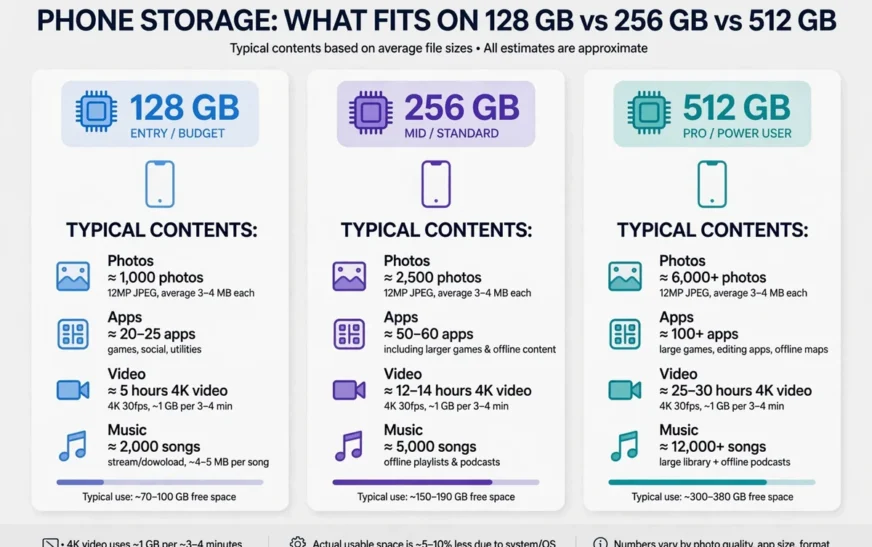
Quick answer: Most people need 256 GB of phone storage. Light users who back everything up to the cloud can manage on 128 GB, heavy users with lots of 4K video, offline music, and big games should choose 512 GB, and only professional creators who keep everything on-device need 1 TB. The deciding factors are video habits, game libraries, and whether you use cloud backup — not the number on the box.
Why the box number lies to you
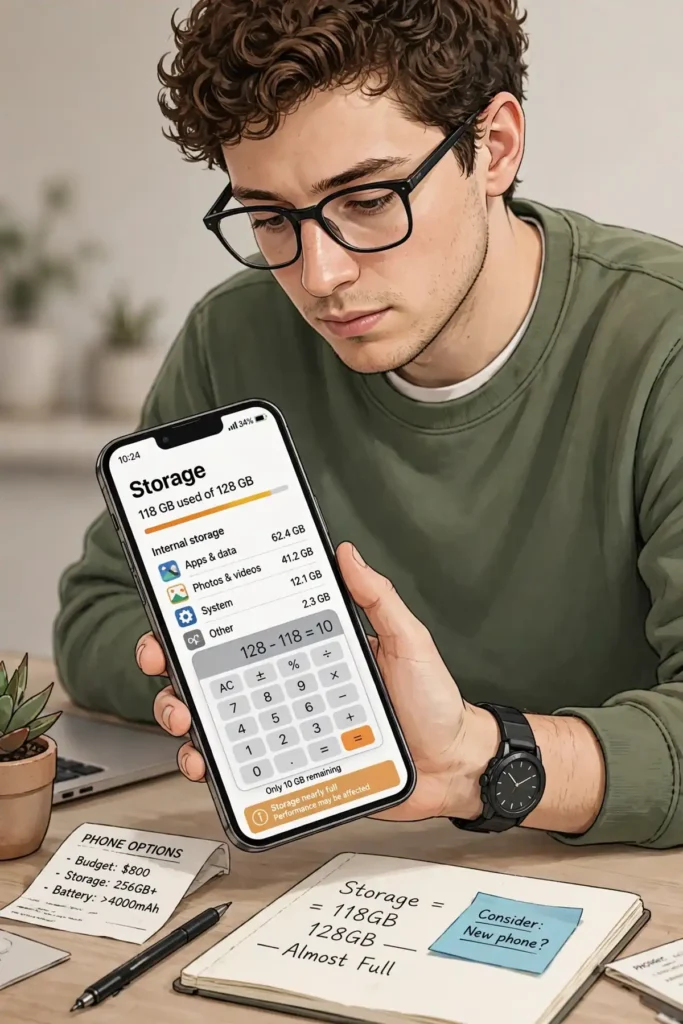
A phone’s advertised storage is never the storage you get to use. Manufacturers measure in decimal gigabytes, while your phone’s operating system measures in binary, which alone trims about 7% off the headline number. Then the operating system and pre-installed apps take their share, typically 12 to 20 GB depending on the phone and software version. A 128 GB phone therefore leaves you with roughly 100 to 112 GB of usable room, and a 256 GB phone with roughly 225 GB.
That gap is why so many people buy the cheapest size and regret it within a year. They did the maths on 128 GB and discovered, too late, that they were really buying about 105 GB. If you are comparing sizes, compare usable room, not box room. CripsyWire’s calculator does exactly that, showing roughly usable space for 64, 128, 256, and 512 GB and 1 TB phones, so you can see the real starting point before you add a single photo.
The second mistake is buying for today instead of for the phone’s whole life. A phone you keep for three or four years will accumulate more photos, more apps, and larger app updates every year. Apps grow with every update, photo files get larger as cameras improve, and a size that feels roomy on day one can feel tight by year three. Buy for the person you will be in two years, not the person you are on purchase day.
Use the phone storage calculator to test your own mix before you commit. Plug in your photos, videos, apps, and music, and see which size still has breathing room left over. That number beats any generic recommendation, including this article’s.
What actually eats storage
Before choosing a size, understand the four things that fill a phone. Photos are the steady drip: CripsyWire’s calculator uses a planning figure of about 3.5 MB per modern photo, so a thousand photos cost roughly 3.5 GB. That sounds manageable until you realise a keen photographer can take a thousand photos in a few months without noticing.
Video is the flood. The same calculator uses roughly 65 MB per minute for 1080p video, about 190 MB per minute for 4K at 30 frames per second, and around 440 MB per minute for 4K at 60 frames per second. An hour of 4K video at 30 frames per second is therefore around 11 GB, and an hour at 60 frames per second is around 26 GB. If you shoot video regularly, video alone can decide your storage size, and it dwarfs everything else.
Apps are the slow creep. The calculator assumes an average app at about 100 MB, but that average hides a huge range: a simple utility may be tens of megabytes, while a big 3D game can be several gigabytes. App updates also grow apps over time, and caches add a hidden layer on top. Messaging apps, streaming apps, and browsers accumulate cached media that can push a modest app past a gigabyte without you ever downloading anything deliberately.
Music, podcasts, and offline content are the wildcard. A downloaded album is small, but a large offline music library, downloaded podcast backlog, and offline maps for several cities add up. Offline video downloads from streaming services are the heaviest of all, and a few downloaded films can eat tens of gigabytes. If you travel without reliable internet and download content in advance, budget for it explicitly.
A concrete sense of photo scale helps here. The guide to how many photos fit on a 128 GB phone translates photo counts into gigabytes, which makes the abstract numbers above feel real for a camera roll.
The light user: 128 GB is enough
You are a light user if you take photos occasionally, stream music and video rather than downloading them, use a modest set of apps, and back photos up to the cloud. You probably delete screenshots, do not play big games, and do not shoot much video. For you, 128 GB is genuinely enough, with room to spare, provided cloud backup is actually turned on.
The condition matters. A light user without cloud backup is a different story, because even occasional photos accumulate over three years, and a phone with no backup is one accident away from losing everything. Turn on photo backup, enable optimized storage so full-resolution originals live in the cloud, and 128 GB becomes comfortable rather than tight. Without backup, step up to 256 GB for the safety margin alone.
Light users should still avoid 64 GB in 2026. After the system takes its share, a 64 GB phone leaves roughly 50 GB usable, and a single year of photos, apps, and updates can consume that. Unused social apps are part of that creep, and closing an account you no longer use — the steps for deleting an Instagram account show how — removes its data as well as its icon. The saving on purchase day is small, and the cost in constant pruning is large. If 64 GB is the only option in your budget, pair it with disciplined cloud backup and regular cleanup, and accept that you will be managing storage for the phone’s whole life.
A light user’s monthly routine is simple: confirm backup is current, delete screenshots and downloads, and offload apps you have not opened. The Android cache-clearing guide covers the Android side of that routine in detail, and the same principles apply on iPhone.
The average user: 256 GB is the sweet spot
The average user takes photos most days, shoots short videos, uses social and messaging apps heavily, keeps a reasonable app collection, and maybe plays one or two games. This is most people, and for most people 256 GB is the size that removes storage from the list of things to worry about. With roughly 225 GB usable, you can keep years of photos, a healthy video collection, and a full app library without constant pruning.
Why not 128 GB for the average user? Because the average user’s habits grow. Photo counts rise, video clips get longer, apps get bigger, and messaging media piles up. A 128 GB phone can work for an average user who is disciplined about cloud backup and cleanup, but it requires attention. A 256 GB phone works for the same user without attention, and that difference is worth the price gap for most buyers. Storage is one of the few phone upgrades you cannot add later on most phones, so buying the comfortable size once beats managing the tight size for years.
Average users should also think about how they move content between devices. Upgrading phones, switching platforms, and restoring from backup all go smoother when you are not fighting a full phone at the same time. The contacts transfer guide is a useful template for the broader move, since the same “back up, verify, then move” discipline applies to photos and files too.
If you are an average user who shoots a lot of video, lean toward 512 GB rather than 256 GB. Video is the one habit that can push an average user into heavy territory without warning, and a summer of 4K clips can erase the headroom that 256 GB seemed to offer.
The heavy user: 512 GB, no debate
Heavy users know who they are. You shoot 4K video regularly, keep a large offline music or podcast library, download films for travel, play several big games, or keep years of photos on-device because you do not trust the cloud. For you, 512 GB is the right answer, with roughly 460 GB usable, and 256 GB will feel tight within a year or two.
Do the video maths honestly. At around 190 MB per minute for 4K at 30 frames per second, a heavy shooter can generate tens of gigabytes in a single weekend. Add a few large games at several gigabytes each, an offline music library, and downloaded films, and 256 GB disappears fast. Heavy users also tend to keep more messaging media, more documents, and more offline content, all of which stack on top of the video.
Cloud backup helps heavy users too, but it does not replace on-device room if your workflow needs files offline. A creator who edits video on the phone, a traveller who downloads content for flights, and a gamer with a big library all need the files locally, and cloud storage cannot substitute for that. In those cases, paying for the larger phone is cheaper than the time lost managing a full one.
Heavy users should also watch heat and battery, because a phone working hard on video and games shows strain in other ways. If your device runs hot during ordinary use, the phone overheating guide helps separate a cooling problem from a storage problem before you blame the wrong thing.
The creator and the 1 TB question
One terabyte phones exist for a narrow group: professional creators who shoot and edit on the phone, keep entire projects on-device, and cannot rely on cloud upload speeds in the field. For them, roughly 930 GB usable is a working tool, not a luxury, and the price premium pays for itself in time saved.
For everyone else, 1 TB is overspending. If you are not editing multi-gigabyte projects on your phone weekly, you will not use the extra room, and the money is better spent on a cloud subscription, an external drive, or a better camera. A good test: look at your current phone’s usage. If you have never passed 400 GB used, you do not need 1 TB next time. If you have passed 500 GB and regularly delete to make room, then 1 TB is worth considering.
Creators should also think about backup differently. A phone holding a terabyte of irreplaceable work needs more than cloud photo backup; it needs a real backup workflow with a computer or external drive, because losing a phone with a terabyte of work is a different order of disaster from losing a phone with a thousand photos. Creators who edit on the phone should also weigh the tools they use, and the best free AI video generators guide is a useful check on whether heavy editing software is earning its gigabytes. The Android backup guide covers the habit, and the principle is the same on any platform: more than one copy, in more than one place.
How cloud backup changes the answer
Cloud backup is the single biggest variable in this whole decision. A user with photo backup and optimized storage enabled needs far less on-device room than the same user without it, because full-resolution originals live online and only smaller versions stay on the phone. That is why two people with identical photo habits can need different phone sizes: one backs up, the other does not.
The trade-off is dependence. Optimized storage needs an internet connection to fetch full-resolution originals, and a cloud subscription is an ongoing cost. If you travel somewhere without reliable internet, or you stop paying for the subscription, the arrangement breaks down. Heavy offline users should therefore buy more on-device storage and treat the cloud as a backup, not as their primary storage.
A sensible middle path is to use the cloud for photos and keep a comfortable on-device size anyway. That way, cloud backup protects you against loss, and on-device room protects you against slow connections and subscription changes. For most buyers, that middle path points back to 256 GB: enough on-device room to be independent, with the cloud as a safety net rather than a crutch.
When you shop, test both scenarios in the phone storage calculator: once with your full photo library on-device, and once with only recent photos kept locally. The gap between those two numbers is exactly what cloud backup is worth to you.
Buying advice: the size you will not regret
Start from your current usage, not from a recommendation. Check your present phone’s storage screen, note how much you use today, and add headroom for two to three years of growth. If you use 90 GB today and keep phones for three years, 128 GB is already tight and 256 GB is the safe choice. If you use 200 GB today, 256 GB is tight and 512 GB is safe. The rule is simple: buy the next size up from your current usage, unless your habits are about to shrink, which they rarely do.
Consider the cost per gigabyte, not just the headline price. The step from 128 GB to 256 GB usually costs far less per gigabyte than the step from 256 GB to 512 GB, and far less than the frustration of managing a full phone for years. On a phone you keep for three years, the monthly cost of the larger size is small, and the time saved is large. Storage is the cheapest peace of mind a phone offers.
Finally, remember that storage is fixed on most modern phones. Unlike a computer, you cannot add a bigger drive later, and on iPhone and most flagships you cannot add a microSD card either. Other parts of a phone can be fixed instead of replaced — the iPhone battery replacement guide is a good example — which is why storage, the one part you cannot fix later, deserves the most care at purchase time. That permanence is the real reason to buy generously: every other phone spec can be worked around with an app, a setting, or an accessory, but a full phone stays full until you delete something or buy a new phone.
FAQ
How much phone storage do I need in 2026?
Most people need 256 GB. Light cloud-first users can manage on 128 GB, heavy video shooters and gamers should choose 512 GB, and only professional creators need 1 TB.
Is 128 GB enough for an average user?
Yes, if you back photos up to the cloud and clean up regularly. Without that discipline, or if you shoot a lot of video, 256 GB is the safer choice.
Is 64 GB enough in 2026?
No, not for most people. After the system takes its share, about 50 GB remains usable, and a year of photos, apps, and updates can consume it. Avoid 64 GB unless you are a very light user with strict cloud backup.
Does cloud storage mean I need less phone storage?
Yes, if optimized storage is enabled, because full-resolution photos live online and smaller versions stay on the phone. It does not help for files you need offline, such as downloaded films and large games.
How much storage does 4K video use?
Roughly 190 MB per minute at 4K 30 frames per second, and around 440 MB per minute at 4K 60 frames per second. An hour of 4K video at 30 frames per second is about 11 GB.
Should I buy 256 GB or 512 GB?
Choose 512 GB if you shoot 4K video regularly, play several big games, keep a large offline library, or already use more than 200 GB. Otherwise 256 GB is the comfortable choice for most people.
The short version
Buy for your habits in two years, not today: 128 GB for light cloud-first users, 256 GB for most people, 512 GB for heavy video shooters and gamers, and 1 TB only for professional creators. Check your current usage, add headroom, and test your real mix in a calculator before you pay.
For more practical phone guides, browse the CripsyWire blog.
Test your own storage needs
Plug in your photos, videos, apps, and music and see which phone size actually fits your life.

Continue Reading on CripsyWire
For more practical AI coverage for US buyers, see our full AI tools and agents library. When you are deciding between competing tools, the reviews and comparisons section breaks down head-to-head matchups. AI features that live inside your phone are tracked in smartphones, and AI on your wrist or finger in wearables. All of this is part of CripsyWire's broader Tech coverage — start at the homepage for what is newest.