Quick answer: Text to image AI turns a written description into a picture. You type a prompt, the tool reads it, and a diffusion model starts from random noise and cleans it up step by step until an image appears. The result depends mostly on the prompt: name the subject, the style, the lighting, and the aspect ratio, and say what to leave out. The best free starting points in 2026 are ChatGPT image generation, Adobe Firefly, Ideogram, and Stable Diffusion, with Midjourney the strongest paid option for style. Images are usually free to use commercially on paid plans, but free tiers vary, so check the plan terms before selling anything made with one.
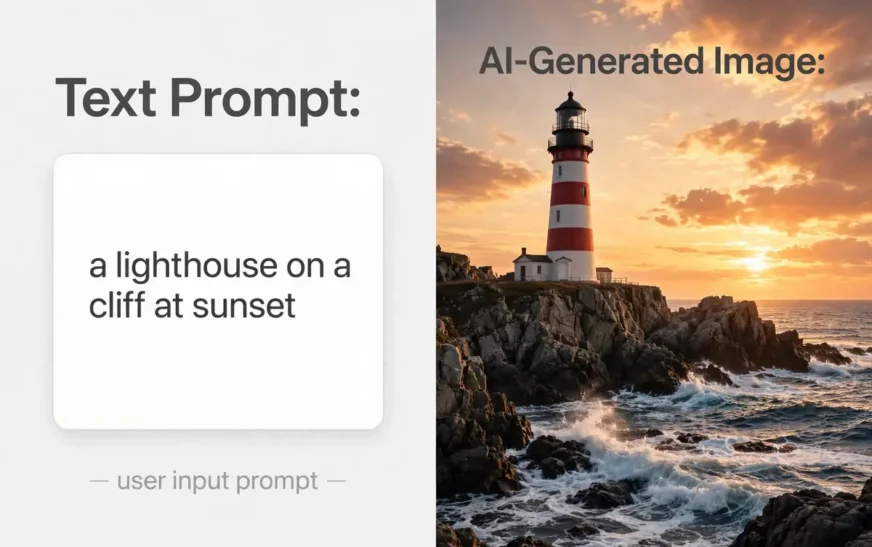
Type a sentence, get a picture. A lighthouse on a cliff at sunset. A product shot of a coffee mug. A logo that almost works. It feels like magic, and the first result often looks impressive enough to hide how much of the outcome is decided before the generate button is pressed.
The prompt is the whole job. Two people can type what sounds like the same request and get results of completely different quality, because one of them described the subject, the style, the light, and the framing, while the other typed six vague words. This guide explains how the technology works in plain language, how to write a prompt that works, which free tools are worth your time, and what you can legally do with the pictures that come out.
If you want to practise the prompt formula as you read, the AI image prompt builder turns the structure in this guide into a finished prompt you can copy into any generator.
How text to image AI actually works
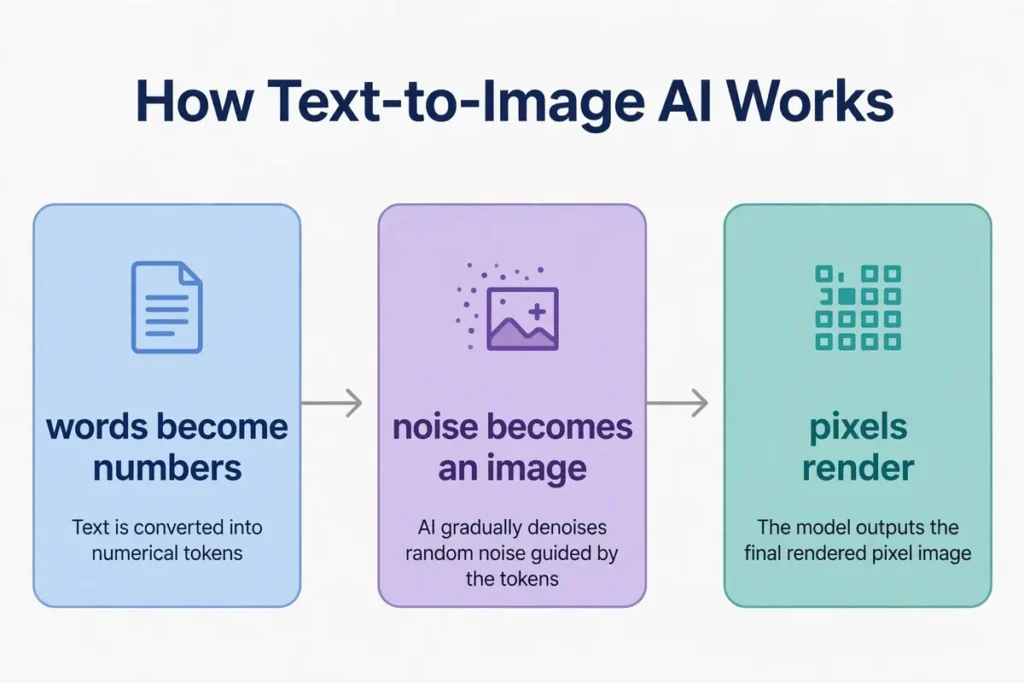
Every major text-to-image tool follows the same three-step pipeline, whether the name on it is Midjourney, DALL-E, Stable Diffusion, Adobe Firefly, or Google’s Imagen.
First, your words become numbers. A text encoder reads the prompt and turns it into a mathematical representation called an embedding: a list of numbers that captures what the words mean and how they relate. The model does not understand English the way you do. It understands proximity: words that appear together in similar pictures end up close together in that number space, so “lighthouse” and “cliff” and “sunset” pull the result in a consistent direction.
Second, noise becomes an image. A diffusion model starts with a canvas of pure random noise, like television static, and removes a little of it step by step, using the embedding as a compass, until a coherent picture forms. It does not learn to draw. It learns one skill extremely well: undoing damage. During training it was shown millions of images with noise added, and it learned to reverse that process. Generation runs the reversal from a blank noisy canvas.
Third, the picture gets rendered. A decoder translates the finished result into the actual pixels you see on screen, at the size and aspect ratio you asked for. That is why the same prompt can produce a square social post, a wide banner, or a vertical phone wallpaper: the aspect is set at render time, not in the words.
Two consequences follow from this. The model has no concept of a hand, because it has never counted fingers; it has only seen many pictures of hands, so extra fingers are a common failure. And the model cannot invent a fact it was never trained on, so a prompt asking for a specific real person in a specific real place will drift toward the closest thing it knows.
How to write a prompt that works
A working prompt has five parts, in this order: subject, action or setting, style, lighting, and composition. Leave one out and the model guesses it, and its guess is rarely yours.
Subject first, with detail. “A lighthouse” gives you a generic lighthouse. “A red-and-white striped lighthouse on a rocky cliff, waves breaking below” gives you a specific one. Name the material, the colour, the number, and the age when they matter. “A ceramic coffee mug” beats “a mug”. “Three ceramic coffee mugs” beats “mugs”.
Setting second. Place the subject somewhere. “On a wooden table by a window” is a setting. “In a studio” is a setting. “At golden hour on a beach” is a setting and a light source at once. A prompt with no setting gets a grey background and a floating object.
Style third. The style word decides the whole look: photograph, oil painting, watercolour, flat illustration, 3D render, anime, cyberpunk, vintage poster. Pick one and commit to it. Mixing two styles in one prompt (“photorealistic oil painting”) pulls the result in two directions and usually satisfies neither. For anime specifically, the guide to Midjourney anime prompts shows how style words change the same character across scenes.
Lighting fourth. Light is the cheapest way to make an image look professional. “Soft morning light through a window”, “neon signs at night”, “harsh midday sun”, “candlelight”. One lighting phrase does more than a paragraph of adjectives.
Composition and aspect last. Say where the subject sits and what shape the image should be: “centred, head and shoulders”, “wide shot, subject on the left third”, “vertical 9:16 for a phone wallpaper”, “square 1:1 for a profile picture”. Lock the aspect before you chase detail, because a beautiful square image cropped to a wide banner loses the subject.
Then add what to leave out. Negative prompts are the quiet half of the craft: “no text, no watermark, no extra fingers, no blurry background, no deformed hands”. The guide on the AI negative prompt explains what to exclude and how, because the words you forbid shape the result as much as the words you include.
A full example, using all five parts: “A red-and-white striped lighthouse on a rocky cliff at sunset, waves breaking below, photorealistic, warm golden-hour light, wide 16:9 shot with the lighthouse on the right third, no text, no watermark.” That is one sentence, and it gives the model everything it needs. For more worked examples in this exact structure, the collection of AI image prompt examples shows the formula applied to products, portraits, landscapes, and logos.
The best free text to image AI tools in 2026
| Tool | Free tier | Best for | Catch |
|---|---|---|---|
| ChatGPT image generation | Yes, limited daily images | General use, editing an image by talking about it | Daily limits on the free tier; best quality on paid |
| Adobe Firefly | Yes, monthly credits | Commercial work, brand-safe images | Credits run out fast on the free tier |
| Ideogram | Yes, limited daily images | Images with readable text in them | Free images are public by default |
| Stable Diffusion | Yes, fully free to run | Full control, private generation, no account | Needs a capable computer or a hosted copy |
| Midjourney | No free tier | Style and artistic quality | Paid only, works through Discord or web |
ChatGPT image generation is the easiest starting point. You describe the picture in plain words, it generates it, and you can then ask for changes in conversation: “make the sky darker”, “remove the boat”, “try it as a watercolour”. That conversational editing is something the other tools do not offer as smoothly. The guide to the ChatGPT image prompt shows how to phrase requests so the edits land where you meant them.
Adobe Firefly is the safest choice for commercial work. Adobe trained it only on licensed content, and it indemnifies business users on paid plans, which means Adobe stands behind the images for commercial use. That matters if the picture will appear in an ad or on a product page. The free tier gives monthly credits, and the images are clean and consistent, though less stylistically adventurous than Midjourney.
Ideogram is the tool to reach for when the image must contain words: a poster, a logo, a sign, a book cover. Most generators mangle text, producing letters that look right at a glance and fall apart on a second look. Ideogram was built specifically around accurate text rendering, and it is the best in 2026 at getting the words right.
Stable Diffusion is the only fully free option with no account and no usage cap, because you can run it on your own computer. The trade-off is setup: it needs a capable graphics card and some patience. Hosted copies exist that run it in the browser, usually with their own credit limits. It is the right choice when privacy matters, because nothing leaves your machine.
Midjourney has no free tier, and it is still the strongest option for pure style. Its images have a distinctive polished look that the others imitate. It works through Discord or its web interface, and the subscription is the price of admission. If the goal is one beautiful image for a personal project, a free tool will do. If the goal is a consistent artistic style across a series, Midjourney earns its fee.
What to do with the result
Generating the image is half the job. The other half is getting it into the shape its destination needs.
Check the aspect first. A square image made for a profile picture will lose its edges when cropped to a wide banner. Regenerate at the right aspect rather than cropping a finished image, because the model composes for the frame it was given. Lock the destination aspect before you burn iterations on detail.
Check the artifacts second. Zoom in and look at hands, faces, text, and background edges. Small errors hide at thumbnail size and appear the moment the image goes large. If the hands are wrong, regenerate with a negative prompt naming the problem. If the text is wrong, switch to Ideogram for that image.
Export at the size the destination needs. Social platforms compress uploads, so starting from the highest resolution the tool offers gives the compression less to destroy. Save the prompt alongside the file, because the prompt is the only way to reproduce or vary the image later. A filename that includes the subject and the date beats a folder of “image-1.png” files.
If the image is close but the wrong size, an extender can help. An AI image extender rebuilds the edges of a picture to fit a wider or taller frame, which is different from stretching it. The result is not in this guide’s scope, but it is the natural next step when a good square image needs to become a wide banner.
Common failures and how to fix them
Extra fingers and strange hands. The most famous failure. Fix it with a negative prompt (“no extra fingers, no deformed hands”) and by asking for the hands to be out of frame or holding something simple. Close-ups of hands are the hardest case; avoid them when the hands are not the point.
Text that looks right and reads wrong. Letters that are almost words. Fix it by using Ideogram for any image that must contain readable text, and by keeping the text short: a shop sign with two words works, a paragraph does not.
Wrong aspect, subject cut off. The image is beautiful and the subject is half out of frame. Fix it by stating the aspect and the composition in the prompt (“vertical 9:16, subject centred, head and shoulders”) instead of hoping the model guesses the frame.
Blurry or low detail. Usually a prompt that is too short. Add the style, the lighting, and one concrete detail about the subject. “A lighthouse” blurs. “A red-and-white striped lighthouse on a rocky cliff at sunset” does not.
Off-style results. The image looks like a cartoon when you wanted a photograph. Fix it by naming one style and removing the other style words. One style word, committed to, beats three style words fighting each other.
Same image every time. The model is deterministic for a given seed. Change the seed or add one new detail to the prompt to break the repetition. A new seed with the same prompt is the fastest way to get variations.
Copyright and commercial use, in plain language
This is the part most guides skip, and it is the part that matters if the image will earn money. The honest summary is that the law has not settled, and the tool terms matter more than the law right now.
Midjourney and DALL-E grant commercial rights on paid plans, so images made on a paid subscription can generally be used in products and ads. Free tiers vary: some allow commercial use, some do not, and some make free images public. Adobe Firefly goes further, training only on licensed content and indemnifying business users, which is the strongest commercial position of any major tool.
No court in most countries has yet decided who owns an AI-generated image, because the copyright law in most places requires a human author and no court has ruled on what that means for a prompt. That uncertainty cuts both ways: it is unlikely anyone can claim exclusive ownership of a generated image, and it is also unlikely a generated image infringes a specific existing work unless it copies one closely.
The practical rules are simple. Check the plan terms before selling anything made with a free tier. Do not generate images of real identifiable people without their permission. Do not ask for a trademarked character or a living artist’s exact style by name and then sell the result. Keep the prompt and the tool name with the file, so you can show how the image was made if anyone asks.
Frequently asked questions
What is text to image AI?
Text to image AI is a tool that turns a written description into a picture. You type a prompt describing the subject, style, lighting, and framing, and a diffusion model generates an image matching that description. The main tools in 2026 are ChatGPT image generation, Midjourney, Adobe Firefly, Ideogram, and Stable Diffusion.
Is text to image AI free?
Yes, with limits. ChatGPT image generation, Adobe Firefly, and Ideogram all offer free tiers with daily or monthly limits. Stable Diffusion is fully free to run on your own computer. Midjourney has no free tier. Free images can usually be used personally, but commercial use depends on the plan terms, so check before selling anything.
How do I write a good text to image prompt?
Name five things in order: the subject with detail, the setting, the style, the lighting, and the composition with aspect ratio. Then add what to leave out as a negative prompt. Example: “A red-and-white striped lighthouse on a rocky cliff at sunset, photorealistic, warm golden-hour light, wide 16:9 shot, no text, no watermark.”
Which text to image AI is best for beginners?
ChatGPT image generation, because you can describe the picture in plain words and then ask for changes in conversation. Adobe Firefly is the best beginner choice for commercial work, and Ideogram is the best when the image must contain readable text.
Can I sell images made with text to image AI?
Usually yes on paid plans, which grant commercial rights. Free tiers vary, and some make free images public. Adobe Firefly offers the strongest commercial position because it trains only on licensed content and indemnifies business users. Check the plan terms for the specific tool before selling.
Why do AI images have problems with hands and text?
Because the model learns from pictures, not from counting. It has seen many hands but never counted fingers, so extra fingers are a common error. Text is hard for the same reason: the model reproduces the shape of letters without understanding spelling. Ideogram is the best current tool for readable text, and a negative prompt naming the problem helps with hands.
Bottom line
Text to image AI is a prompt skill more than a tool skill. The tools are close enough in quality that the difference between a good image and a bad one is almost always the description: subject with detail, setting, one committed style, lighting, and composition with the aspect locked early. The free tiers are generous enough to learn on, and the paid plans earn their fee when the images need to be consistent, commercial, or full of readable text.
Start with ChatGPT image generation for general work, Ideogram when the image must contain words, and Firefly when the image will appear in something you sell. Write the prompt with the five-part formula, add what to leave out, save the prompt with the file, and check the plan terms before the image earns money.
If the images are part of a daily workflow rather than a one-off, the guide to the best AI productivity tools shows where image generation fits alongside the other tools that actually earn their keep.
For people turning AI output into income, the guide to AI side hustles covers the eight that actually pay, and where generated images fit into them.
If the still image is only the start and you want motion, the guide to the best free AI video generators tests the free options for turning images and prompts into video.
Generated images pile up fast, and a library of exports fills storage like any other photo collection. The phone storage calculator shows how much room your image habits need before the phone starts complaining.
A 128GB phone holds roughly 20,000 to 40,000 standard photos, and generated images count toward the same limit. The guide on how many photos 128GB holds breaks the numbers down by image type.
Build your next prompt in seconds
Turn the five-part formula in this guide into a finished prompt — subject, style, lighting and all — free, with no sign-up.
Continue Reading on CripsyWire
For more practical AI coverage for US buyers, see our full AI tools and agents library. When you are deciding between competing tools, the reviews and comparisons section breaks down head-to-head matchups. AI features that live inside your phone are tracked in smartphones, and AI on your wrist or finger in wearables. All of this is part of CripsyWire's broader Tech coverage — start at the homepage for what is newest.