Quick answer: An AI negative prompt is the list of things you tell an image generator to leave out — flaws like “blurry, extra fingers, watermark, text” and unwanted objects or styles. In Stable Diffusion it goes in a separate “Negative prompt” box; in Midjourney it goes at the end of the prompt as –no followed by the things to exclude, for example “–no text, watermark”. It works best for concrete flaws and objects, not for vague wishes, and it never guarantees a perfect image on its own.
What a negative prompt actually does
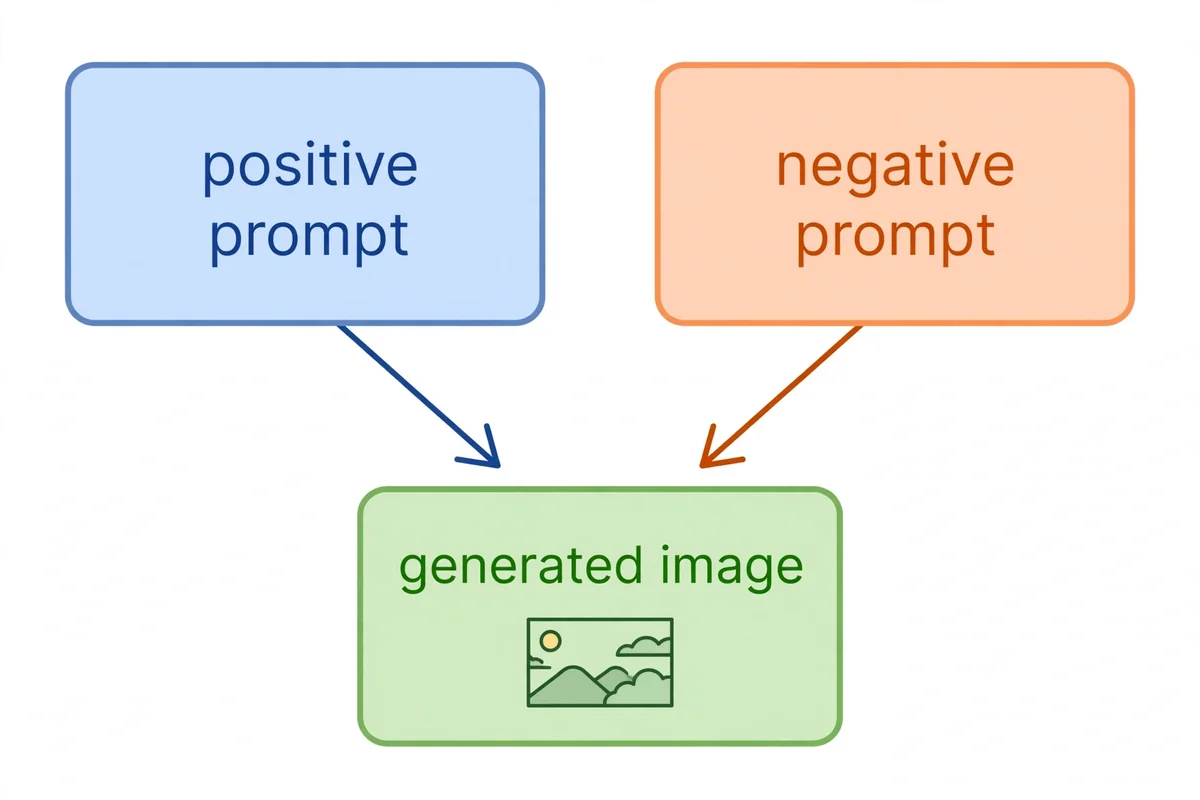
A normal prompt tells the model what to move toward. A negative prompt tells it what to move away from. During generation, the model compares the picture it is building against both instructions: toward your description, away from your exclusions. That push-and-pull is why a short negative list can clean up an image more effectively than adding ten more positive adjectives.
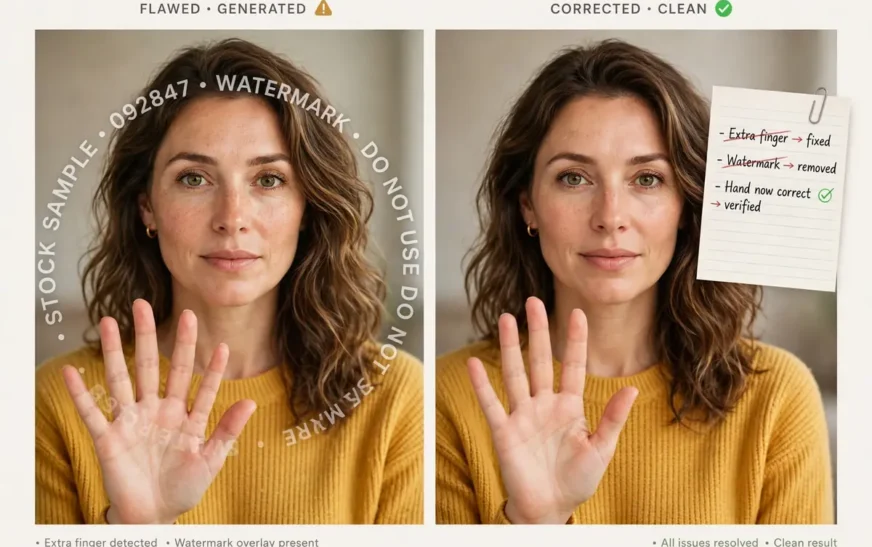
It helps to think of it as editing, not magic. If your portrait keeps coming out with blurry hands, adding “extra fingers, deformed hands, blurry” to the negative prompt steers the model away from its most common hand mistakes. If your product shot keeps picking up reflections, adding “reflections, shadows, clutter” steers it toward a cleaner surface. The negative prompt does not teach the model a new skill. It tells it which of its existing habits to suppress.
That distinction matters because it sets expectations. A negative prompt can reduce a problem, sometimes dramatically. It cannot fix a prompt that is fundamentally confused, and it cannot force a model to do something it cannot do, like render perfect small text. Used with that understanding, it becomes one of the most practical tools in prompting. Used as a cure-all, it becomes a long list of words that the model partly ignores.
Where the negative prompt goes in each tool
The syntax changes by tool, and using the wrong syntax in the wrong tool is the most common beginner mistake.
Stable Diffusion has a separate field, usually labelled “Negative prompt”, next to the main prompt box. You type a comma-separated list there: “blurry, low quality, deformed hands, extra fingers, watermark, text, jpeg artifacts, oversaturated”. That list is the standard starting point for a photorealistic portrait, and it is worth memorising, because it covers the flaws Stable Diffusion produces most often. Some interfaces let you weight a term with parentheses, such as “(extra fingers:1.5)”, to push harder against one specific problem. Use weighting sparingly, for one stubborn flaw, not for the whole list.
Midjourney has no separate negative box. Instead you append the –no parameter at the end of the prompt, after the description and before or alongside other parameters: “a serene mountain lake at dawn –no boats, people”. That tells Midjourney to leave boats and people out. You can also use negative weights with double-colon syntax to soften rather than fully exclude something, but –no is the everyday tool, and it works best for discrete objects: text, watermarks, boats, people, cars.
ChatGPT and other chat-style tools have no negative field at all. There is one message box, and the model reads it as a description. If you write “no text” in the middle of a sentence, the model may treat “text” as a thing to include, because it has no separate channel for exclusions. The workaround is to describe the scene positively: “a clean white wall” instead of “a wall with no clutter”, or “an empty beach” instead of “a beach with no people”. Positive phrasing is not a perfect substitute, but it is the only reliable one in a single-box tool.
Knowing which system you are in saves a lot of frustration. A Stable Diffusion negative list pasted into Midjourney does nothing. A Midjourney –no flag pasted into ChatGPT confuses it. Match the syntax to the tool, and the same idea works in all three.
What belongs in a negative prompt
A good negative list has three kinds of entries, and most prompts only need a few of each.
Quality flaws. These are the defects every image model produces sometimes: blurry, low quality, low resolution, distorted, grainy, noisy, jpeg artifacts, oversaturated, underexposed. A short quality baseline — “low quality, blurry, distorted, artifacts” — belongs in almost every Stable Diffusion generation, because it costs nothing and removes the worst outcomes.
Anatomy flaws. These matter whenever people or animals are in the frame: extra fingers, deformed hands, malformed hands, extra limbs, missing fingers, bad proportions, asymmetrical face, cross-eyed. Hands deserve special attention, because they are the most common visible flaw in generated people. If hands are not important to your image, the simplest fix is to keep them out of frame, but when they are visible, anatomy negatives are essential.
Unwanted objects and styles. These are specific to your image: watermark, text, signature, logo, border, frame, cartoon, painting, sketch, 3D render, plastic, fake. Use these when the model keeps adding something you did not ask for, or when a style keeps creeping in that you do not want. If you want photorealism and the model keeps giving you illustration, “cartoon, painting, illustration, sketch” in the negative prompt pushes it back toward realism.
What does not belong is everything else: vague wishes, positive qualities restated as negatives, and long lists of unrelated terms. “Not ugly” is not a useful negative, because “ugly” has no single visual meaning. “Beautiful” in the positive prompt already covers the wish. A negative list of thirty unrelated terms dilutes the ones that matter, because the model spreads its attention across all of them. Five focused terms beat thirty scattered ones, every time.
What a negative prompt cannot do
Negative prompts have real limits, and knowing them prevents wasted hours.
First, they cannot remove something that is central to your positive prompt. If your prompt describes “a crowded market” and your negative prompt says “no people”, the model faces a contradiction, and the result will be confused. Negatives work on the edges of a scene — background clutter, extra objects, style drift — not on its core subject. If you do not want people, do not describe a crowd.
Second, they cannot fix a broken composition. A negative prompt will not reframe a shot, fix a perspective error, or turn a landscape into a portrait. Those are positive prompt jobs: framing, angle, and subject placement. Use negatives to clean a good composition, not to rescue a bad one.
Third, they are not guarantees. A model can still produce an extra finger even with “extra fingers” in the negative prompt, because the negative steers probability, it does not forbid an outcome outright. When a flaw persists across several generations, the fix is usually to change the composition — fewer hands in frame, a simpler pose, a larger face — rather than to lengthen the negative list.
Fourth, they depend on the tool supporting them. As noted, chat-style tools have no negative channel, and some newer models ignore negative settings in certain modes. Before building a workflow around negatives, check that your tool and mode actually support them. A negative prompt that is silently ignored is worse than no negative prompt, because it gives false confidence.
Finally, negatives can backfire when they are too aggressive. Excluding “dark” can wash out a night scene. Excluding “shadows” can flatten a portrait. Excluding “red” from a sunset can drain the sunset. Every exclusion removes something, and sometimes it removes a quality the image needed. If an image looks worse after adding a negative, remove the last term you added and regenerate. That one-term-at-a-time discipline applies to negatives just as it does to positives.
Copy-ready negative prompts
Photorealistic portrait baseline: “blurry, low quality, deformed hands, extra fingers, watermark, text, jpeg artifacts, oversaturated”
Clean product shot: “cluttered background, shadows, reflections, fingerprints, dust, watermark, text, border”
Realistic landscape: “cartoon, painting, illustration, sketch, watermark, text, oversaturated, blurry, low resolution”
Anime or illustration (when you want clean line art): “blurry, low quality, deformed hands, extra fingers, watermark, text, photorealistic, 3D render, grainy”
Character portrait, Midjourney style: “a character portrait of a young explorer, warm lamplight, detailed –no text, watermark, extra fingers, blurry”
Architecture shot: “people, cars, watermark, text, distorted perspective, blurry, low quality, oversaturated”
Notice how short these are. Each one targets a specific failure mode for its image type, and none of them tries to cover every possible flaw. Start from the baseline for your image type, then add one term for the specific problem you actually see, not for problems you imagine.
For building prompts with negatives included, the CripsyWire AI image prompt builder is a useful starting point. Its own guide notes that Stable Diffusion users get a ready-made negative prompt to copy, which is a good way to see a sensible baseline before you customise it.
Debugging a negative prompt that is not working
When a negative prompt seems to do nothing, work through this checklist in order.
Is the syntax right for the tool? A Stable Diffusion list in Midjourney, or a –no flag in ChatGPT, does nothing. Check the tool first, because this is the most common cause and the easiest fix.
Is the term concrete? “Bad” and “ugly” are not concrete. “Extra fingers”, “watermark”, and “text” are. Replace vague terms with specific ones, and the negative starts working.
Is the negative contradicting the positive? “A busy street –no people” is a contradiction. Resolve it by changing the positive description, not by strengthening the negative.
Is the list too long? Thirty terms dilute each other. Cut the list to the five most relevant terms and regenerate. If the problem improves, you found the dilution effect.
Is the flaw actually in the negative’s reach? Text rendering, exact logos, and complex hands in a crowd are hard problems that negatives only partly help. Change the composition: less text, no logo, fewer hands in frame.
Is guidance turned up enough? In Stable Diffusion, negative prompts work through guidance, and very low guidance weakens them. This is a technical setting, and if you are using a hosted tool you may not control it, but it is worth knowing that a negative that works at normal guidance may fade at very low guidance.
If none of that helps, try the opposite approach: strengthen the positive. Instead of “no clutter”, describe the clean background you want. Instead of “no people”, describe an empty scene. Positive description is often more powerful than negative exclusion, and the two together — a clear positive plus a short negative — beat either one alone.
Negative prompts across tools, compared
It is worth seeing the three systems side by side, because the comparison makes the trade-offs clear.
Stable Diffusion gives you the most control. A separate field, weighting syntax, and a long tradition of shared negative lists mean you can fine-tune exclusions precisely. The cost is complexity: you must learn the field, the syntax, and the weighting, and different interfaces implement them slightly differently.
Midjourney gives you a simple, memorable tool in –no. It is easy to learn and works well for discrete objects. The cost is granularity: you cannot weight a long list as finely, and you cannot separate exclusions from the main prompt text the way Stable Diffusion does.
ChatGPT gives you no negative channel, but it gives you conversation. You can iterate by describing changes in words, which is a different kind of control, and for many users it is faster than learning negative syntax. The cost is precision: you cannot forbid a specific flaw, only describe around it.
The right choice depends on the job. For a technical image where one flaw keeps recurring, Stable Diffusion’s negative field is the best tool. For a quick artistic image where you want to drop one object, Midjourney’s –no is the fastest. For a scene you want to talk through, ChatGPT’s conversational editing is the most natural. Knowing all three, and when to switch, is more valuable than mastering any one in isolation.
This tool-matching habit shows up elsewhere in creative tech. The best free AI video generators guide makes the same point about video: the tool matters less than matching its strengths to the job in hand.
Building your own negative library
Over time, you will develop a personal negative library: a few lists you reuse, tuned to the images you make most. Build it deliberately. Start with the baselines in this guide. Each time a new flaw appears repeatedly, add one term for it to the relevant list, and note which image type it belongs to. Each time a term causes a side effect — a washed-out night scene, a flattened portrait — remove it or narrow it.
Keep the lists short. A library of three lists with five terms each is more useful than one list with fifty terms, because you can actually remember what each list does and when to use it. Label them by image type, not by tool, so you can translate them: a portrait list, a product list, and a landscape list, each with a Stable Diffusion version and a Midjourney –no version.
Share lists with care. A negative list copied from someone else’s workflow may include terms for flaws their model produces and yours does not, or terms that fight your style. Use shared lists as starting points, then tune them against your own results. Your library should reflect your images, not someone else’s.
And revisit the library occasionally. Models change, and a term that was essential six months ago may be unnecessary now, while a new flaw may need a new term. A library that never changes is a library that is slowly going stale.
Negative prompts in everyday image types
Negative prompts are not only for portraits. They clean up almost every image type, because every image type has its own recurring flaws, and a short exclusion list for each type saves a lot of regeneration.
A workspace image, for example, often picks up cable clutter and screen glare. A negative list of “cable clutter, screen glare, watermark, text” keeps a desk scene tidy, and the guide to a two-screen desk setup shows what a tidy desk actually looks like, which helps you judge whether the generated version is close.
A tech explainer image often picks up garbled text on screens and devices. Adding “text, watermark, blurry screen” to the negative list helps, and the explainer on the next wireless standard is a good example of an article where clean device images matter more than decorative ones.
A charging or gadget image often picks up reflections and fingerprints. A negative list of “reflections, fingerprints, dust, clutter” keeps product-style images clean, and the roundup of the best wireless chargers shows how a clean product photo should read: one object, one surface, no distractions.
A phone image often picks up a distorted screen or a warped hand holding the phone. Anatomy and screen negatives — “deformed hands, distorted screen, blurry” — help here, and the troubleshooting guide for a faulty phone microphone is a reminder that phone images are judged by readers who know what a phone should look like.
A laptop or Chromebook image often picks up a garbled keyboard or a distorted screen hinge. Negatives like “distorted keyboard, warped screen, text” help, and the guide to switching off a Chromebook touchscreen shows the device clearly enough to use as a reference for what “correct” looks like.
A browser or productivity image often picks up unreadable tab text and cluttered windows. A negative list of “unreadable text, cluttered windows, watermark” keeps it usable, and the collection of productivity browser extensions shows how a clean browser workspace should feel.
A hardware image often picks up tangled cables and mislabelled parts. Negatives like “tangled cables, mislabelled parts, blurry” help, and the guide on identifying your PC hardware is a useful reference for what a correct hardware image contains.
An examples article is a good place to see negatives in action across many image types at once. The collection of AI image prompt examples shows finished prompts and their results, and reading them with negatives in mind — what was excluded, not just what was included — teaches the technique faster than any list.
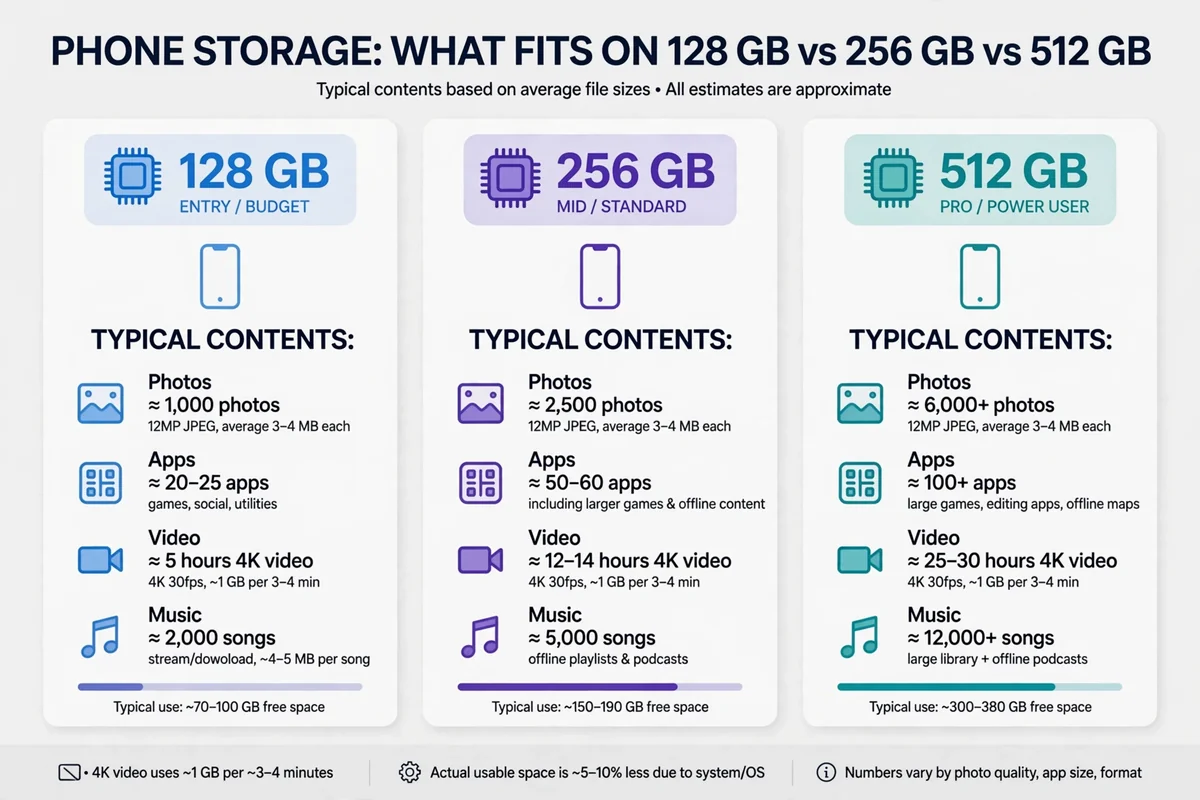
A photo-heavy article is another good test. The guide to how many photos fit on 128GB uses phone and photo imagery throughout, and the cleanest images in it are the ones where clutter was excluded, not just where the subject was described well.
Finally, a messaging or account image often picks up fake interface text. A negative list of “fake text, watermark, blurry interface” helps, and the guide to deleting a Telegram account shows real interface steps, which is a good standard to hold generated interface images against.
The lesson across all of these is the same: write the negative list for the image type in front of you, not from a generic master list. Five relevant terms beat thirty generic ones, every time.
FAQ
What is an AI negative prompt?
It is a list of things you tell an image generator to leave out, such as flaws, unwanted objects, or styles. It steers the model away from those things while the main prompt steers it toward what you want.
Where do I put a negative prompt in Stable Diffusion?
In the separate “Negative prompt” box next to the main prompt. Type a comma-separated list, such as “blurry, low quality, extra fingers, watermark, text”.
How do negative prompts work in Midjourney?
Midjourney has no separate box. Add –no at the end of the prompt, followed by the things to exclude, for example “–no text, watermark”.
Does ChatGPT support negative prompts?
Not as a separate field. In a single message box, describe the scene positively instead: “a clean white wall” rather than “a wall with no clutter”.
Why is my negative prompt being ignored?
Usually the syntax is wrong for the tool, the terms are vague, the list is too long, or the negative contradicts the positive prompt. Check those in order, and shorten the list to the most relevant terms.
Can a negative prompt guarantee no extra fingers?
No. It reduces the chance, sometimes a lot, but it does not forbid an outcome outright. If a flaw persists, change the composition, such as fewer hands in frame or a simpler pose.
The short version
A negative prompt is a short, focused list of what to leave out, written in the syntax your tool understands: a separate box in Stable Diffusion, –no in Midjourney, positive phrasing in ChatGPT. Keep it to concrete flaws and objects, keep it short, and pair it with a clear positive prompt. Used that way, it turns a good prompt into a clean image, without promising a perfection it cannot deliver.
More practical guides live on the CripsyWire blog.
The site itself is at CripsyWire.
For background on who runs it, see the about page.
Build prompts with negatives included
Pick your style and tool, and copy a ready-to-paste prompt — including a sensible negative prompt for Stable Diffusion.
Continue Reading on CripsyWire
For more practical AI coverage for US buyers, see our full AI tools and agents library. When you are deciding between competing tools, the reviews and comparisons section breaks down head-to-head matchups. AI features that live inside your phone are tracked in smartphones, and AI on your wrist or finger in wearables. All of this is part of CripsyWire's broader Tech coverage — start at the homepage for what is newest.