Quick answer: A uuid v7 generator creates a 128-bit identifier that starts with the current time in Unix milliseconds, followed by random bits. Because the time comes first, new IDs sort in roughly the order they were created. That ordering is the whole point: databases can append new rows near each other instead of scattering them through an index, which keeps inserts faster and indexes tighter over time.
Most IDs are chosen by habit, not by design
Ask a developer how they pick an ID and you will usually get the same answer: whatever the library gave them by default. That default is often a fully random identifier. It works. It is unique enough for almost any app. It also quietly taxes your database on every single insert, because a random value has no relationship to the row that came before it or the row that will come after it.
Version 7 fixes that specific problem without giving up uniqueness. It keeps the familiar 36-character UUID shape, with the same hyphens in the same places, but it changes what the first characters mean. Instead of starting with random bits, a version 7 ID starts with time. The rest is still random, so two IDs made in the same millisecond do not collide in practice, and nobody can guess the next ID just by seeing the last one. You get sortability and unpredictability in the same string, and that combination is why version 7 has become the sensible default for new systems that store a lot of rows.
That does not make every older ID format wrong. It makes the choice worth five minutes of thought before you commit to it for years, because an ID format touches primary keys, foreign keys, URLs, logs, and caches, and is painful to change later. Pick the format that matches how your data will actually be written and read.
If you want to see the shape right away, try the CripsyWire UUID tool and look at the first characters of a few generated values. Generate several in quick succession and you will see the leading characters stay close together, then move forward as time passes. That is the timestamp doing its job in plain sight.
What version 7 actually is
A UUID is a 128-bit number, normally written as 32 hexadecimal characters grouped as 8-4-4-4-12, for example in the familiar xxxxxxxx-xxxx-7xxx-yxxx-xxxxxxxxxxxx pattern. The 7 in that pattern is the version nibble. It tells any reader, human or machine, that this is a version 7 value. The y position carries the variant bits, which mark the value as following the standard UUID layout rather than one of the older, incompatible layouts.
The current standard is RFC 9562, published in May 2024, which obsoletes RFC 4122. RFC 9562 did not invent version 7 out of thin air. Time-ordered identifiers had been used in production systems for years under various names, and different implementations disagreed on details. The new standard pinned the layout down so libraries in different languages would produce values that sort the same way and parse the same way. If you are building anything new, RFC 9562 is the document to point at, and version 7 is the version it added for this exact job.
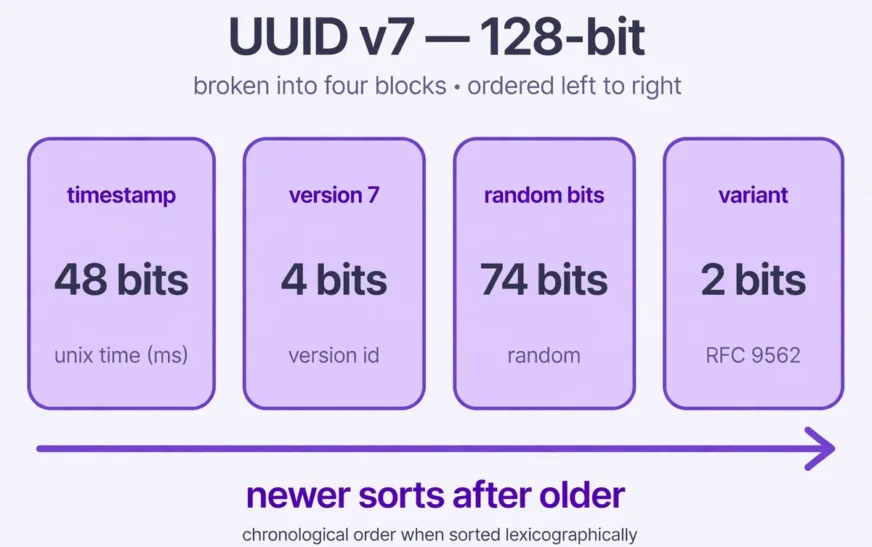
Here is the layout, in order:
- 48 bits: Unix timestamp in milliseconds. This is the number of milliseconds since 1 January 1970, UTC. It occupies the first 12 hex characters, which is why version 7 IDs sort by creation time when sorted as text.
- 4 bits: version. Always
0111in binary, which is7in hex. - 12 bits: random data. These bits fill out the rest of the timestamp field group.
- 2 bits: variant. Always
10in binary for standard UUIDs. - 62 bits: random data. The remaining random portion, giving the value its uniqueness within a single millisecond.
Add it up: 48 + 4 + 12 + 2 + 62 = 128 bits. Only the timestamp is predictable. The other 74 bits are random, which is plenty of room to keep IDs made in the same millisecond apart. A single millisecond can hold a huge number of distinct random combinations, and a well-written generator also handles clock quirks, such as a system clock stepping backward, rather than silently emitting a duplicate or a value that sorts out of order.
One honest limit follows from that layout. A millisecond timestamp is coarse, so IDs made in the same millisecond have random order within that millisecond, not exact order. Version 7 gives rough chronological order, not a perfect sequence number. If you need strict within-millisecond order, use a separate sequence or a precise timestamp column.
Why databases prefer version 7 over random IDs
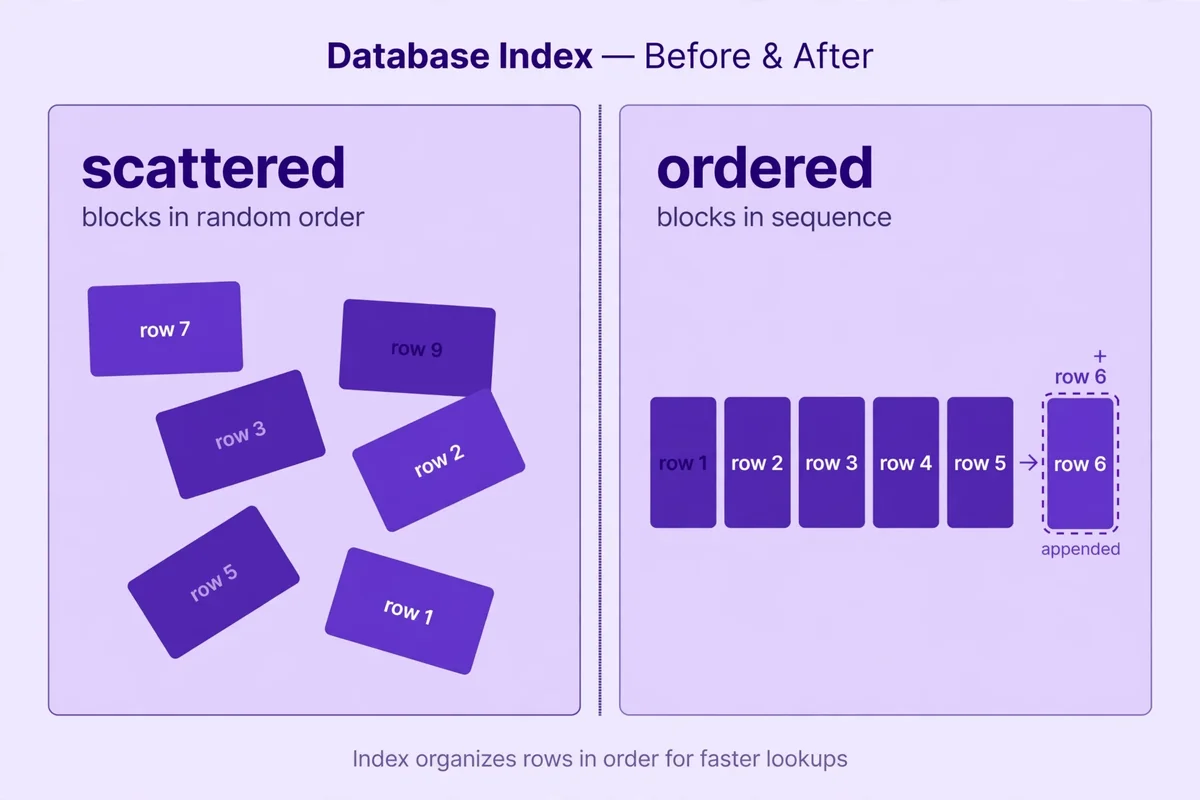
To understand the database case, picture a B-tree index: the default index in most relational databases, a sorted tree of pages, each holding a batch of keys in order. Insert a new key and the database finds its page and puts it there. If the page is full, it splits into two pages and updates the tree above. Splits are normal, but they cost work and leave pages partly empty.
Now picture inserting random keys. Each new key lands somewhere unpredictable in the middle of the existing range. The database reads a scattered page, inserts into it, and splits it when it fills. Over millions of inserts, pages end up fragmented, the index grows fatter than it needs to be, and scans of recent rows jump around instead of reading one tidy stretch.
Version 7 inserts behave differently. Each new ID is, in most cases, larger than the ones made before it, so each new key belongs at or near the end of the index. The database appends to the rightmost pages instead of splitting pages all over the tree. Splits still happen, but at the edge, where they are cheap and predictable. Recent rows sit next to each other, so a query for the last hundred orders reads a compact range instead of hopping between distant pages. That locality compounds as the table grows.
You will barely notice this in a toy app with a few thousand rows. You will feel it every day in a table with tens of millions of rows and heavy write traffic, where the primary key is also the clustering key. For that kind of system, the ID format is a performance decision, not a cosmetic choice.
There is a second, quieter benefit: sorting. Sort version 7 IDs as strings and you get roughly chronological order for free, which helps cursor pagination, stable log order, and debugging. Keep a real timestamp column for filtering and display — the ID is not a replacement for it.
Storage deserves a brief reality check. As text, a UUID takes 36 characters; as native 128-bit binary, 16 bytes. Version 7 costs the same as any other UUID version. The savings come from a denser index and fewer splits, not from a smaller ID. Work out the real numbers for your own data, in the same spirit as the phone storage calculator, instead of trusting a slogan.
Slow lookups have many causes, and the ID format is only one of them. Bad queries, missing indexes, and under-provisioned hardware will hurt you far more than any UUID version. Version 7 removes one known source of index churn, so the rest are easier to find — the same chain-of-small-causes lesson in the guide to fixing slow DNS lookups. Check your query plans before blaming the ID format alone.
Version 7 against the rest of the family
UUID versions are not ranked from worst to best. Each one answers a different question, and version 7 is the answer to “I need a unique ID that also sorts by creation time.” Knowing what the others do keeps you from reaching for version 7 where a different tool fits better.
Version 1 combines a timestamp with a node identifier, historically a MAC address, making early version 1 IDs traceable to a specific machine — a privacy problem RFC 9562 itself warns about. Avoid it for new systems unless you understand that leak. Version 7 keeps the time-ordering idea, drops the node entirely, and replaces it with random bits. You keep the sortability and lose the fingerprint.
Version 4 is the familiar fully random form, with 122 random bits and the version and variant bits fixed. It has no ordering, and it reveals nothing about when or where it was made. That privacy property is genuinely valuable. If your IDs must not leak creation time, or your table is small enough that index locality will never matter, version 4 remains a fine choice. Version 7 trades a small amount of that privacy for ordering. Make that trade knowingly.
Version 5 derives an ID from a namespace plus a name using SHA-1, so the same input always produces the same output. That determinism is the point: a stable ID for a known thing, derivable independently by every system. Version 7 is the opposite idea — a fresh, unique, ordered value for something being created right now. Do not swap them.
Two special values round out the set. Nil is the all-zeros UUID, 00000000-0000-0000-0000-000000000000, and Max is the all-ones UUID, ffffffff-ffff-ffff-ffff-ffffffffffff. They are useful as sentinels: Nil for “no value yet” in systems that cannot use a null, and Max as an upper bound in range checks. Neither is a versioned ID you would generate for a real row, and neither should appear as a primary key in production data unless you deliberately chose it as a marker and documented that choice.
Standards change for concrete reasons, not fashion. RFC 4122 described the versions that existed at the time; RFC 9562 added the time-ordered and deterministic forms real systems had already started using. The same pattern shows up in wireless standards — see Wi-Fi 8 explained — where a new standard is a snapshot of solved problems, not a marketing label.
When version 7 is the wrong call
A good tool used in the wrong place still causes damage. Version 7 has three real drawbacks, and you should check all three before adopting it.
First, the timestamp is public. Anyone who sees a version 7 ID can read the creation time to the millisecond. For most orders, posts, and events, that is harmless. For sensitive records — a medical intake, a private report, a whistleblower submission — leaking even the creation time can narrow down who did what and when. If your threat model includes “an outsider must not learn when this record was created from the ID alone,” use a fully random form and keep the timestamp in a protected column instead.
Second, ordering can leak business information. If your IDs are visible in URLs and they sort by time, a competitor can estimate how many records you created in a week by sampling IDs. Sequential integer IDs leak this far more obviously, and version 7 leaks it only in aggregate, but the leak is real. If that matters, keep IDs internal and expose opaque public references instead. That is a general rule for any ordered ID, not a flaw unique to version 7.
Third, the clock matters. Version 7 assumes the generating machine’s clock is roughly correct. A clock that jumps backward, or two servers whose clocks disagree by seconds, can produce IDs that sort out of order across machines. Good generators handle small backward steps, but none can fix a clock that is wildly wrong. Keep servers on reliable time sync, monitor drift, and test what your library does when the clock steps back.
Version 7 IDs are unique in practice, not by mathematical proof. The random portion makes collisions vanishingly unlikely, but two generators with the same broken clock and a broken random source could still collide. Use a proper random source and a maintained library, and do not hand-roll the bit layout in production without tests to back it up. The same verify-don’t-assume discipline applies to your own machine — see how to check your motherboard model.
Generating one, and using it well
Use a maintained library, not a hand-rolled bit hack. Check that the library names RFC 9562, that it uses a secure random source, and that its tests cover same-millisecond generation and backward clock steps. Generate the ID at the point of creation, store it as a native UUID type where your database offers one, and keep a separate created-at timestamp column for queries and display. If you sort by the ID alone in an API, document that the order is roughly chronological, not exact within a millisecond.
For quick tests and mock data, a browser tool is enough — browse the full CripsyWire tools collection alongside the UUID tool.
For capacity planning, measure growth before it surprises you: a data usage calculator will not size your index, but it trains the estimate-first habit.
The same lesson shows up in the guide to how many photos 128GB can hold: totals depend on size per item, and UUIDs are no exception.
Moving from random IDs to version 7 without breaking things
Do not rewrite existing primary keys in place on a live table. That path breaks foreign keys, cached URLs, and any client that stored the old value. Use a staged migration instead.
- Back up first, and test the restore. Treat this like any move of valuable data: read the guide to backing up an Android phone for the mindset, then apply it to your database with a real backup and a restore test, not just a backup job that says it succeeded.
- Add a new column, keep the old one. Add a version 7 column alongside the existing key, backfill it for old rows in batches, and dual-write it for new rows. Old rows get a value stamped at backfill time, so their order will reflect the migration, not their original creation — say so in your runbook.
- Move readers first, then writers. Point reads, APIs, and exports at the new column in stages, watching for mismatches. Moving data between systems has the same failure modes as moving personal data between phones, which is why the steps in how to transfer contacts to a new phone read like a migration checklist: export, verify counts, import, verify again, then switch over.
- Clean up test and stale data before cutover. Old test rows with invented IDs will pollute your ordering checks. Clear them deliberately, in the same spirit as the guide to clearing cache on Android: remove what is stale, keep what is real, and confirm the system still works after the cleanup.
- Cut over, monitor, then retire the old column. Switch the primary key only after readers have run on the new column without errors, watch index size and insert latency for at least one full traffic cycle, and only then drop the old column. Keep the migration script and its logs. Future you will want them.
FAQ
What does a uuid v7 generator produce?
A 128-bit UUID whose first 48 bits are the current Unix time in milliseconds, followed by version, variant, and random bits. It looks like any other UUID, but it sorts in roughly chronological order.
Is version 7 still unique if two IDs share a millisecond?
Yes, in practice. IDs made in the same millisecond differ in their 74 random bits, which gives an enormous number of distinct values per millisecond. Use a secure random source and a maintained library.
Does version 7 replace a timestamp column?
No. Keep a real created-at column for filtering, display, and exact ordering. Version 7 gives rough chronological order and better index locality; it does not give exact within-millisecond sequence.
Can I mix version 7 with older IDs in one table?
You can during a migration, with separate columns, but do not mix formats in a single primary key column and expect clean sorting. The ordering benefit only holds when the column holds one consistent format.
Does version 7 hide when a record was created?
No. The timestamp is readable from the ID itself. If creation time must stay private, use a fully random form for public-facing IDs and keep timestamps in protected columns.
Should every new project use version 7?
Most new projects with a growing database should, because the cost is zero and the index benefit grows with the table. Small, low-write apps and privacy-sensitive records are the honest exceptions.
The short version
Random IDs are not broken. They are just indifferent to order, and databases pay for that indifference on every insert. Version 7 keeps uniqueness, adds rough chronological order, and removes the node privacy leak of version 1, inside the same familiar UUID shape. If your table will grow or you paginate by recent rows, it is the default worth switching to — through a staged migration, with backups tested, not a weekend rewrite of your primary keys.
More practical guides live on the CripsyWire blog.
The site itself is at CripsyWire.
For background on who runs it, see the about page.
Make a time-ordered ID in seconds
Generate a fresh version 7 ID, check its timestamp prefix, and copy it straight into your code or test data.

Continue Reading on CripsyWire
For more practical AI coverage for US buyers, see our full AI tools and agents library. When you are deciding between competing tools, the reviews and comparisons section breaks down head-to-head matchups. AI features that live inside your phone are tracked in smartphones, and AI on your wrist or finger in wearables. All of this is part of CripsyWire's broader Tech coverage — start at the homepage for what is newest.