Most UUIDs look like a random jumble of letters, digits, and hyphens. They are not random in structure. A UUID is a 128-bit value, normally written as 32 hexadecimal characters in five groups, separated by four hyphens: 8-4-4-4-12. Once you see where the version digit sits and where the variant bits sit, the standard pattern stops looking like magic and starts looking like a checklist.
This guide explains that pattern piece by piece: the standard form, the stricter version-aware form, the looser shape-only form, patterns for specific versions, and working code in JavaScript and Python.
If you need a fresh value to test against, generate a UUID with the CripsyWire tool and paste it into the examples below.
Quick answer: what is the standard UUID pattern?
The standard pattern for a hyphenated UUID is eight hex characters, a hyphen, four hex characters, a hyphen, four hex characters, a hyphen, four hex characters, a hyphen, and twelve hex characters — written as 8-4-4-4-12.
^[0-9a-fA-F]{8}-[0-9a-fA-F]{4}-[0-9a-fA-F]{4}-[0-9a-fA-F]{4}-[0-9a-fA-F]{12}$
For a strict match, the first character of the third group must be the version digit (1–8), and the first character of the fourth group must be 8, 9, a, or b, which marks the standard variant.
What a UUID Actually Is
A UUID is a 128-bit identifier. The text form you usually see is not the value itself; it is a readable rendering of those 128 bits as hexadecimal. Hexadecimal uses sixteen symbols: digits 0–9 and letters a–f. Each hex character carries 4 bits, so 32 hex characters carry exactly 128 bits.
The hyphens are formatting, not data: they break the 32 characters into groups for readability. Strip them and you still have the same 128 bits. A pattern that requires hyphens will reject the bare form, and one that forbids them will reject the normal form — decide which forms you accept first.
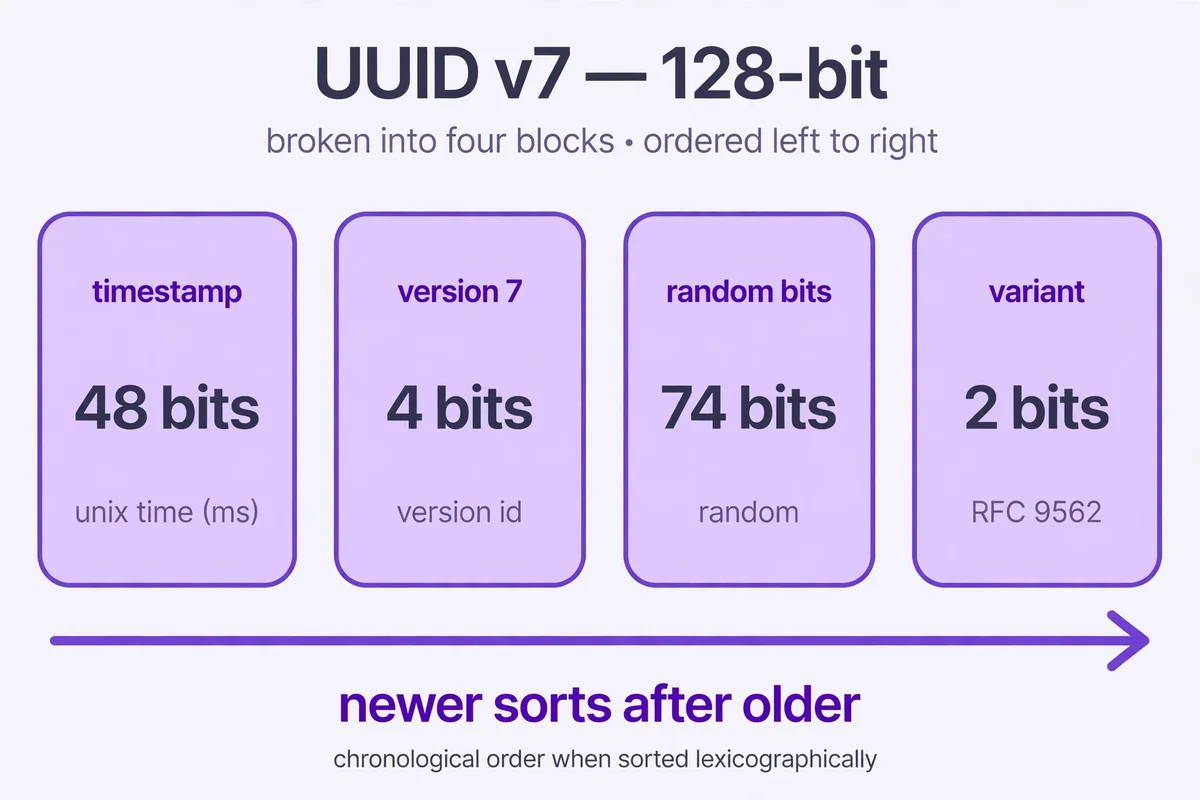
RFC 9562, published in May 2024, is the current standard and obsoletes RFC 4122. It formally covers versions 0–8, plus Nil and Max. A pattern that hard-codes only versions 1, 3, 4, and 5 will reject valid version 6, 7, and 8 values — a quiet failure, since version 7 is now common.
The versions, briefly: version 1 combines a timestamp with a node value, historically a MAC address, and RFC 9562 flags the privacy problem with exposing that address. Version 3 hashes a namespace and a name with MD5; version 5 does the same with SHA-1. Version 4 draws its bits from a random source, with 122 random bits once version and variant bits are fixed. Version 6 reorders version 1 fields so the value sorts better. Version 7 pairs a Unix millisecond timestamp with random bits, making it time-ordered and friendlier to database indexes than a purely random value. Version 8 is reserved for custom formats. Nil is all zeros. Max is all ones.
For a broader sense of how CripsyWire covers practical tooling topics, the CripsyWire tools hub collects the site’s calculators and builders in one place.
The Standard Pattern, Read Left to Right
Here is the general pattern, with anchors:
^[0-9a-fA-F]{8}-[0-9a-fA-F]{4}-[0-9a-fA-F]{4}-[0-9a-fA-F]{4}-[0-9a-fA-F]{12}$Read it as a sentence: ^ anchors the start, [0-9a-fA-F] is one hex character, {8} repeats it eight times, - is a literal hyphen, and the rest repeats that logic through 4-4-4-12, with $ anchoring the end.
Without ^ and $, a pattern can match a UUID-shaped substring inside a longer string — useful when searching text, never when validating a field. Validation means the whole input must be a UUID, so anchor both ends; searching means dropping the anchors and adding word boundaries, as shown later.
The pattern accepts both upper and lower case hex, as UUIDs appear in practice. A lower-case-only pattern will reject an otherwise valid upper-case UUID, and that rejection will look like a data error when it is really a pattern error. Unless you have a documented reason to enforce lower case, accept both.
Stick with the explicit class [0-9a-fA-F]: the shorthand \h means hex digit in some engines, horizontal whitespace in others, and does not exist in JavaScript.
Piece by Piece: The Five Groups
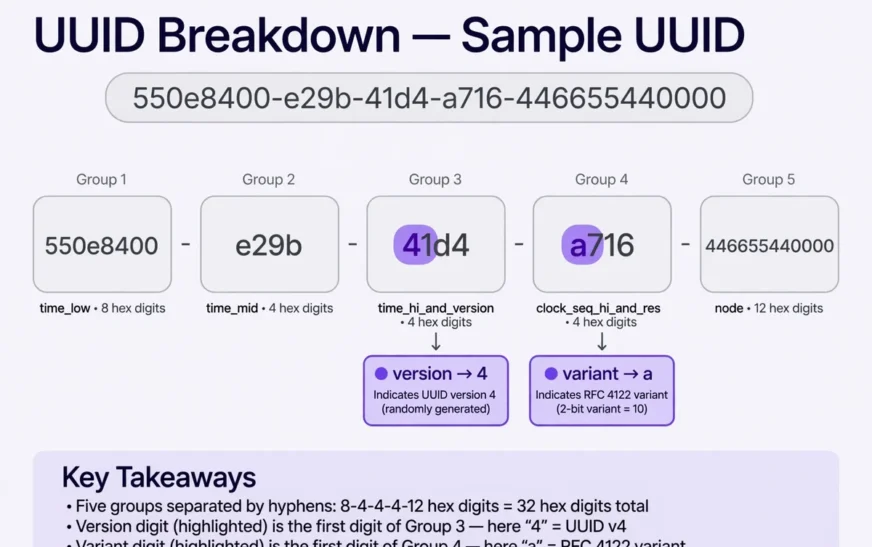
| Group | Length | What it holds | Example slice |
|---|---|---|---|
| 1 | 8 hex chars | High bits of the timestamp or random data, depending on version | 550e8400 |
| 2 | 4 hex chars | Next bits of the timestamp or random data | e29b |
| 3 | 4 hex chars | Version digit first, then remaining bits | 41d4 |
| 4 | 4 hex chars | Variant bits first, then remaining bits | a716 |
| 5 | 12 hex chars | Node or remaining random data | 446655440000 |
The example is the well-known sample UUID 550e8400-e29b-41d4-a716-446655440000, which exists in documentation precisely so examples do not collide with live data. Use it in your own tests.
Group 3 holds the version: its first character is the version digit (4 in the example, so version 4). Group 4 holds the variant: for the standard RFC 9562 variant, used by nearly every UUID you will meet, its first character is 8, 9, a, or b (a in the example).
Why only those four? The standard variant sets the top bits of that byte to 10 in binary, and hex digits starting with binary 10 are exactly 8 through b. The list falls out of the bit layout; it was not chosen arbitrarily.
Groups 1, 2, and 5 carry no fixed marker. Their contents depend on the version — timestamp pieces, random bits, a hash, or a node value — so a general pattern should not constrain them beyond hex characters of the right length.
The same piece-by-piece discipline helps elsewhere: a guide like how to check your motherboard model breaks one vague task into verifiable steps.
The Strict Pattern: Version and Variant Enforced
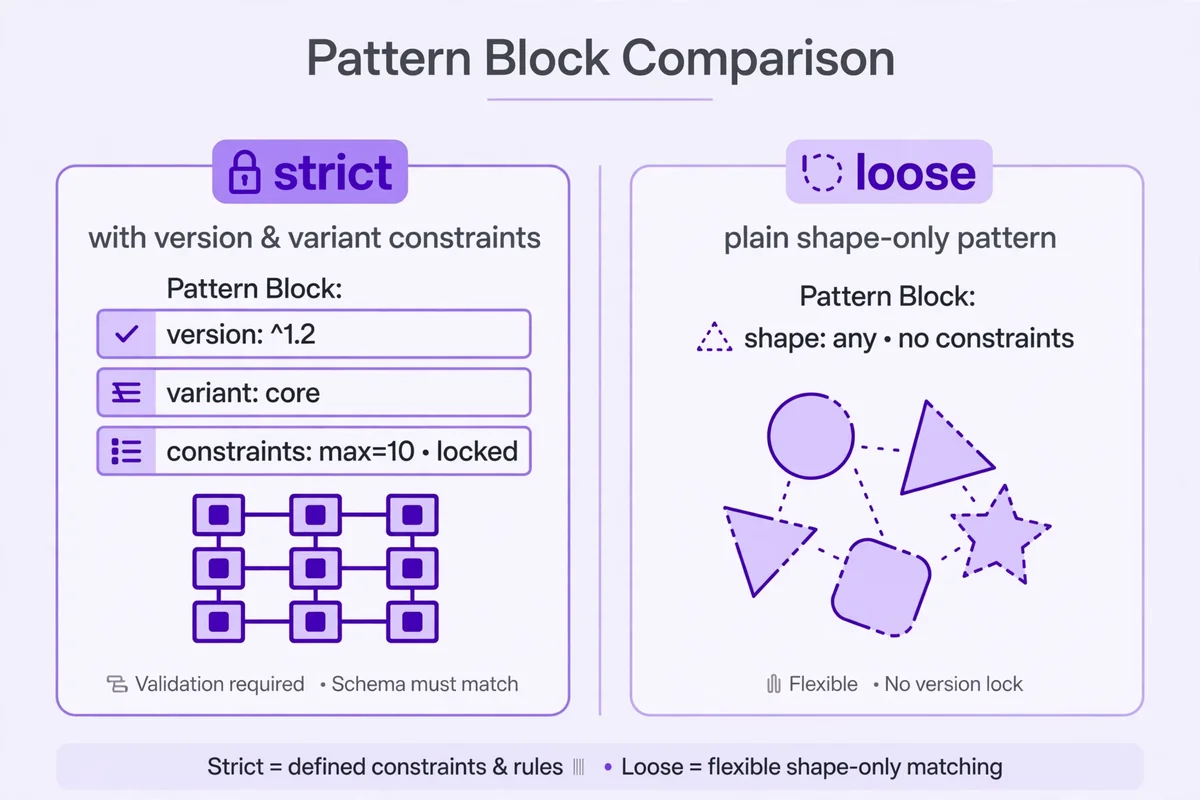
A strict pattern adds two constraints to the general pattern: the version digit and the variant character. For versions 1 through 8, it looks like this:
^[0-9a-fA-F]{8}-[0-9a-fA-F]{4}-[1-8][0-9a-fA-F]{3}-[89abAB][0-9a-fA-F]{3}-[0-9a-fA-F]{12}$Two small changes carry all the meaning: group 3 becomes [1-8][0-9a-fA-F]{3} (one version digit, three free hex characters) and group 4 becomes [89abAB][0-9a-fA-F]{3} (one variant character, three free).
Use the strict pattern when validating input that claims to be standards-compliant. It catches generators that filled all 32 characters from a random source without fixing the version and variant positions — a value that looks fine but is not a valid UUID, and that downstream parsers may treat oddly.
The strict pattern has a cost: it rejects Nil (00000000-0000-0000-0000-000000000000) and Max (ffffffff-ffff-ffff-ffff-ffffffffffff), whose version digits (0 and f) fall outside 1–8. If your system uses Nil as a “no value” sentinel, handle Nil and Max as explicit special cases before the strict check.
The strict pattern also rejects older variant forms, such as Apollo NCS and Microsoft GUID variants, which use different variant bit patterns. Decide consciously whether those old forms count as valid in your system, ideally before a legacy data migration, not during one.
The Loose Pattern: Shape Only
When you are scanning logs or cleaning data, a UUID-shaped string is often good enough to flag for a second look. That is the loose pattern’s job — the general pattern without anchors:
[0-9a-fA-F]{8}-[0-9a-fA-F]{4}-[0-9a-fA-F]{4}-[0-9a-fA-F]{4}-[0-9a-fA-F]{12}For extraction, do not anchor the loose pattern — it would only match a lone UUID. Wrap it in \b word boundaries so it does not match the middle of a longer hex string:
\b[0-9a-fA-F]{8}-[0-9a-fA-F]{4}-[0-9a-fA-F]{4}-[0-9a-fA-F]{4}-[0-9a-fA-F]{12}\bOne flaw: \b will not protect you from a longer hyphenated hex string that contains a UUID-shaped run. If your input can contain those, use lookarounds to require a non-hex, non-hyphen character on each side — noting that older JavaScript environments do not support lookbehind.
Loose matching is triage, not a verdict: it says only that a string has UUID shape, not that its version, variant, or generation is correct. Find candidates loosely, then run the strict check when correctness matters. Mixing up those jobs is the single most common UUID regex mistake.
Patterns for Specific Versions
Version-specific patterns suit systems that accept only one version — a column storing only time-ordered values, an API issuing one version, or a test suite needing version-correct fixtures. Take the strict pattern and replace [1-8] in group 3 with that version digit; the variant stays [89abAB].
| Version | Group 3 start | Notes |
|---|---|---|
| 1 | 1 | Timestamp plus node; node can expose a machine address |
| 3 | 3 | MD5 namespace plus name |
| 4 | 4 | Random bits; 122 random bits once version and variant are fixed |
| 5 | 5 | SHA-1 namespace plus name |
| 6 | 6 | Reordered timestamp for better sorting |
| 7 | 7 | Unix millisecond timestamp plus random bits; better for database indexes |
| 8 | 8 | Custom, vendor-defined format |
Example, version 4:
^[0-9a-fA-F]{8}-[0-9a-fA-F]{4}-4[0-9a-fA-F]{3}-[89abAB][0-9a-fA-F]{3}-[0-9a-fA-F]{12}$Example, version 7:
^[0-9a-fA-F]{8}-[0-9a-fA-F]{4}-7[0-9a-fA-F]{3}-[89abAB][0-9a-fA-F]{3}-[0-9a-fA-F]{12}$Nil and Max get exact matches, not patterns: ^00000000-0000-0000-0000-000000000000$ and ^ffffffff-ffff-ffff-ffff-ffffffffffff$ (plus an upper-case Max alternative if your system preserves case).
A version-specific pattern checks shape plus that one digit. It cannot verify that a version 7 timestamp is sane or that a version 5 value hashes the claimed name — those are semantic checks no regex performs.
Choosing a version is a design decision, not a regex decision. For values that sort in creation order and behave well as database keys, version 7 is the modern default. For a value that reveals nothing about when or where it was made, version 4 from a good random source is safer. For the same input always producing the same identifier, version 5 (SHA-1) beats version 3 (MD5) on hash strength, though neither is a security mechanism on its own.
The same logic shows up in phone care: a guide on why a phone overheats separates causes instead of offering one generic fix.
Braces, URNs, and the Bare 32-Character Form
Real-world UUIDs do not always arrive in the clean hyphenated form. Braced form wraps the UUID in curly braces: {550e8400-e29b-41d4-a716-446655440000}. URN form prefixes it: urn:uuid:550e8400-e29b-41d4-a716-446655440000. Bare form drops the hyphens entirely: 550e8400e29b41d4a716446655440000, matched by ^[0-9a-fA-F]{32}$. The strict bare form puts the version digit at position 13 and the variant character at position 17: ^[0-9a-fA-F]{12}[1-8][0-9a-fA-F]{3}[89abAB][0-9a-fA-F]{3}[0-9a-fA-F]{12}$ — twelve free characters, one version digit, three free, one variant, three free, twelve free, thirty-two in total.
For mixed input, normalise first, then validate once: strip braces and any urn:uuid: prefix, convert to one canonical form, then run a single strict pattern. One validation path beats three that can drift apart.
JavaScript: Validation That Says What It Means
Two JavaScript traps survive into production because a single quick test misses them: forgetting the anchors, and using a global-flag pattern for validation, which makes test() stateful through lastIndex and alternates true/false on repeated calls.
This function avoids both traps — strict pattern, no global flag:
const STRICT_UUID_PATTERN =
  /^[0-9a-fA-F]{8}-[0-9a-fA-F]{4}-[1-8][0-9a-fA-F]{3}-[89abAB][0-9a-fA-F]{3}-[0-9a-fA-F]{12}$/;

function isStrictUuid(value) {
  return typeof value === "string" && STRICT_UUID_PATTERN.test(value);
}

isStrictUuid("550e8400-e29b-41d4-a716-446655440000"); // true
isStrictUuid("550e8400-e29b-41d4-a716-446655440000 "); // false: trailing space
isStrictUuid("550e8400-e29b-91d4-a716-446655440000"); // false: version 9 does not exist
isStrictUuid("550e8400-e29b-41d4-c716-446655440000"); // false: variant c is not standard
Trim pasted input before validation: a strict validator that rejects a trailing space creates support tickets for a non-problem. For extraction, use the loose pattern with the global flag and matchAll. To generate values in the browser, use crypto.randomUUID(), which returns a version 4 value, instead of hand-rolling a generator from Math.random(), which is not a suitable random source for identifiers that must be unpredictable.
For background on the wider tooling landscape, the CripsyWire blog covers practical guides in the same direct style as this article.
Python: The Same Patterns, With One Extra Option
In Python, always use raw strings for patterns, so backslashes are not interpreted by Python’s string parser before the regex engine sees them.
import re

STRICT_UUID_PATTERN = re.compile(
    r"^[0-9a-fA-F]{8}-[0-9a-fA-F]{4}-[1-8][0-9a-fA-F]{3}-"
    r"[89abAB][0-9a-fA-F]{3}-[0-9a-fA-F]{12}$"
)

def is_strict_uuid(value):
    return isinstance(value, str) and STRICT_UUID_PATTERN.fullmatch(value) is not None

print(is_strict_uuid("550e8400-e29b-41d4-a716-446655440000"))  # True
print(is_strict_uuid("550e8400-e29b-41d4-a716-44665544000"))   # False: too short
Prefer fullmatch() for validation and findall() with the loose pattern for extraction.
Python’s uuid module is often the better validation tool: uuid.UUID(value) parses braces, URN, and bare forms, raises ValueError on bad input, and exposes .version and .variant, so you can check semantics in code instead of encoding them in a pattern.
One caution: uuid.UUID() is lenient in ways a strict regex is not. It accepts bare, braced, and URN forms, and reports an out-of-range version digit as None rather than raising an error. Pair it with explicit version and variant checks when strictness is required. The regex is the fast shape gate; the parser is the precise check behind it.
The same principle applies to phones: clearing the Android cache is a narrower, safer first step than wiping data you need.
Common Mistakes, With the Fix for Each
Forgetting the anchors. A validation pattern without ^ and $ accepts a longer string that merely contains a valid UUID. Fix: anchor validation patterns, always.
Allowing only lower case. A pattern written as [0-9a-f] rejects upper-case UUIDs that are perfectly valid. Fix: use [0-9a-fA-F] or a case-insensitive flag.
Using . or \w for hex positions. A pattern like ........-....-....-....-............ matches any characters, including letters beyond f. Fix: use the explicit hex class everywhere.
Writing the group lengths from memory. The groups are 8-4-4-4-12. Fix: copy the lengths from the table in this guide and test with the sample UUID.
Requiring a specific version without meaning to. A pattern that hard-codes 4 in group 3 will reject version 7 values from a modern system. Fix: use [1-8] unless you have a documented reason to pin one version.
Confusing extraction with validation. A loose pattern used to validate will accept version 9 and variant c values. A strict pattern used to extract will miss valid values in mixed text. Fix: use loose for finding, strict for validating, in that order.
Test against: the sample UUID, an upper-case UUID, a version 7 UUID, a Nil value, a wrong-length value, a non-hex character such as g, a trailing space, and a bare value against a hyphenated pattern.
The same case-by-case approach works for network symptoms. A guide to fixing slow DNS lookups narrows the cause before prescribing a fix.
When a Regex Is the Wrong Tool
A regex is the right tool for shape checking and text extraction. It is the wrong tool for several jobs that look similar.
Do not use a regex to generate UUIDs. A pattern describes a set of strings; it does not pick one. Use crypto.randomUUID() in JavaScript, the uuid module in Python, or your platform’s equivalent, and let the generator set the version and variant bits correctly. Do not use a regex to compare UUIDs across formats — a braced, bare, and hyphenated UUID can denote the same value, so normalise first — or to check uniqueness (a database lookup) or as a security boundary, since an attacker can produce a valid UUID on demand. Prefer a parser when your language provides one and your rules include version or normalisation; keep the regex for fast shape gating and extraction.
Storage questions benefit from the same clarity about what a tool can and cannot tell you. A calculator for how many photos 128GB can hold is useful precisely because it states its assumptions instead of pretending one number fits every camera.
Frequently Asked Questions
What is the simplest pattern that matches a standard UUID?
The general pattern: ^[0-9a-fA-F]{8}-[0-9a-fA-F]{4}-[0-9a-fA-F]{4}-[0-9a-fA-F]{4}-[0-9a-fA-F]{12}$. It checks shape and hex characters only, not version or variant.
How do I check the version of a UUID with a pattern?
Look at the first character of the third group — the version digit: 1, 4, 7, and so on through 8. For more than a shape check, parse the value and read its version field in code.
Why does a strict pattern reject the all-zeros UUID?
The all-zeros value is Nil, meaning “no UUID,” not a versioned UUID; its version digit is 0, outside the 1–8 range. If Nil is an empty sentinel in your system, allow it as an explicit special case first.
Can one pattern match both upper-case and lower-case UUIDs?
Yes. Use [0-9a-fA-F] in every hex position, as all patterns in this guide do, or apply a case-insensitive flag (i in JavaScript, re.IGNORECASE in Python) to a lower-case-only pattern.
What is the difference between a loose pattern and a strict pattern?
A loose pattern checks shape only: 32 hex characters in 8-4-4-4-12 groups. A strict pattern checks shape plus the version digit (1–8) and the variant character (8, 9, a, or b). Use loose patterns to find UUID-shaped strings in text, and strict patterns to validate input that must be a standards-compliant UUID.
Should I accept UUIDs without hyphens?
Accept the bare form only if your system genuinely receives it. Safer: normalise all forms to one canonical lower-case hyphenated form on input, then validate strictly.
Does the pattern change for version 7 UUIDs?
The shape does not change — same 8-4-4-4-12 layout, version digit 7, and a Unix millisecond timestamp in the leading bits of group 1. The practical difference is behaviour: version 7 values sort in creation order, making them a better default for database keys.
How do I extract UUIDs from a log file or a block of text?
Use the loose pattern without anchors, with word boundaries, and with the global flag (JavaScript) or findall (Python). Then confirm each candidate strictly: loose to find, strict to confirm.
Putting It Together
Start with the general pattern for learning or extracting, move to the strict pattern for validating, and pin a single version digit only when a system accepts one version. Normalise braced, URN, and bare forms first, handle Nil and Max explicitly when they matter, and test against the cases listed earlier.
The standard pattern is small enough to memorise: five groups, one version digit, and one variant character encode the whole RFC 9562 layout in a single line.
To test a pattern against a live value, generate a UUID and run it through the examples above.
For readers who want to keep exploring practical tooling, the AI image prompt builder is another hands-on tool in the same collection.
The phone storage calculator answers a storage question with real inputs instead of a generic estimate.
If you are moving data between devices, the guide on transferring contacts to a new phone covers the steps in order.
The guide on backing up an Android phone is the safety net to run before any migration.
Readers interested in AI topics can also read the AI image prompt examples.
The guide on how to create an AI agent keeps the same step-by-step approach.
Need a UUID to test with?
Grab a fresh, standards-formatted value in seconds and paste it straight into the patterns above.
Generate a UUID
Continue Reading on CripsyWire
For more practical AI coverage for US buyers, see our full AI tools and agents library. When you are deciding between competing tools, the reviews and comparisons section breaks down head-to-head matchups. AI features that live inside your phone are tracked in smartphones, and AI on your wrist or finger in wearables. All of this is part of CripsyWire's broader Tech coverage — start at the homepage for what is newest.